3D printer bed adhesion: why prints won't stick and how to fix it
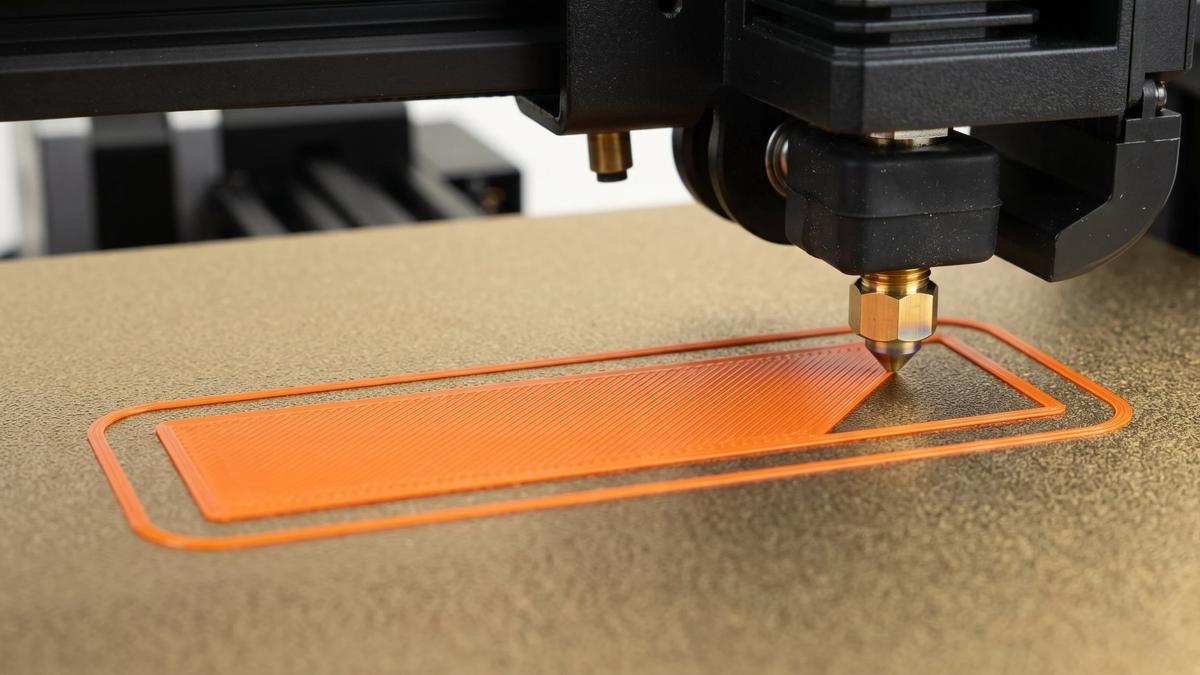

Most 3D printer bed adhesion problems, whether a 3D print won't stick to the bed at all or its corners lift halfway through, come down to three things: how clean the build plate is, how high the nozzle lays the first layer, and whether the bed temperature and surface suit the filament. Check them in that order, and most prints stay put.
There's also the opposite problem: a print that won't come off, or one that damages the plate on the way out. That has different fixes, covered further down.
Start with the three usual suspects
Everything an FDM printer builds sits on its first layer, so when a print fails in the first few minutes, the cause is usually at the plate. Our FDM explainer covers why the first layer matters so much.
- A clean plate. Fingerprints and grease are the usual reason a plate that worked yesterday doesn't today. Wipe it with isopropyl alcohol once it has cooled, and wash it with dish soap and water if prints still won't stick.
- The right first-layer height. Too high and the plastic just lies on the plate; too low and it gets smeared and scraped. How to read it is below.
- The right temperature and surface for the filament. Start from your filament's profile, and make sure the slicer knows which plate is on the printer.
If all three check out and the print still fails, the symptom tells you where to look next.
Which problem do you have?
Match what you see to the closest row:
| Symptom | Likely cause | What to try |
|---|---|---|
| Filament won't stick at all and gets dragged around by the nozzle | Nozzle too high, dirty plate or bed too cool | Clean the plate, bring the nozzle slightly closer, check the bed temperature |
| First layer looks ridged, rough or see-through | Nozzle too low | Raise the first layer slightly |
| First layer is fine in one area but too high or too low in another | Bed not level, an outdated bed mesh, or debris under the sheet | Re-level the bed or rerun the bed mesh, and check under the sheet |
| First layer sticks, but the corners lift as the print grows | Warping: the plastic shrinks as it cools | Brim, no drafts, an enclosure for ABS and ASA |
| Print breaks loose partway through | Small contact area, or a curled edge that the nozzle catches | Brim, better orientation, check for warping |
| Print won't come off, or pulls a piece of the plate with it | Too much adhesion, often PETG or TPU on smooth PEI, or a first layer set too low | Glue stick as a release layer, a textured plate, let it cool |
Get the first layer height right
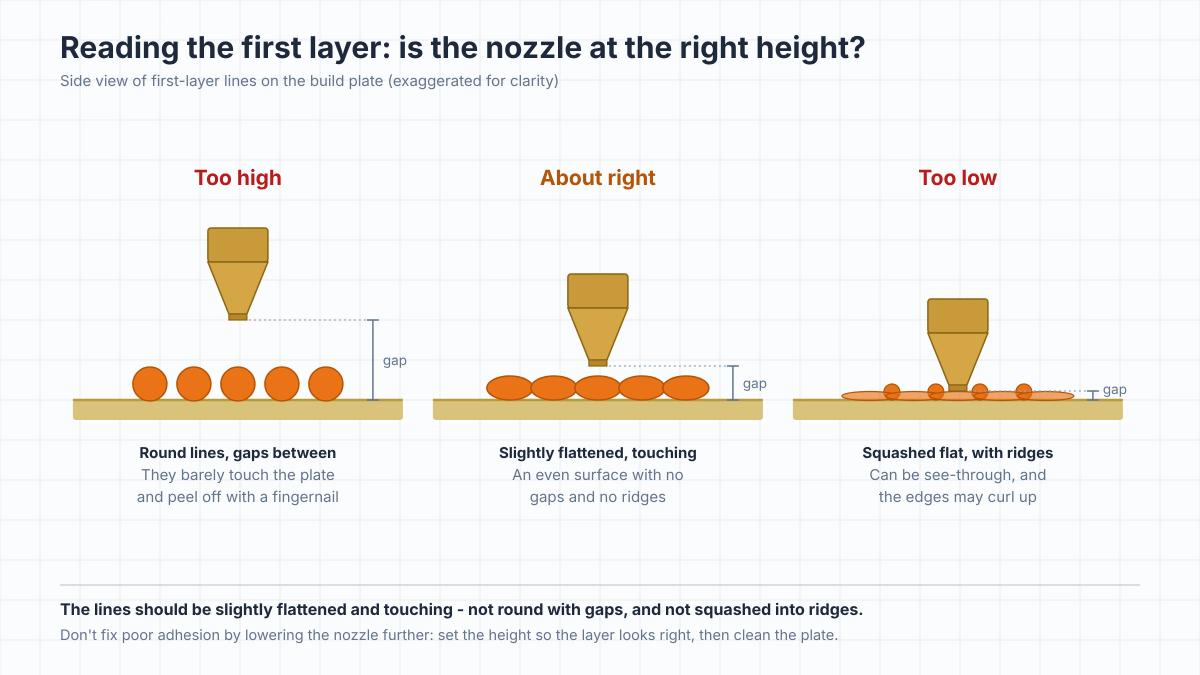
The gap between the nozzle and the plate on the first layer is set by the printer's Z offset; Prusa calls its version Live Adjust Z. It's the setting that decides whether the first layer bonds, and you can read it from the first layer itself:
- Too high: the lines stay round, like strands of spaghetti laid side by side, with gaps between them. They peel off with a fingernail.
- About right: the lines are slightly flattened and touch each other, giving an even surface with no gaps and no ridges.
- Too low: the lines are squashed flat with ridges between them, and in extreme cases the layer is thin enough to see through. On any plate, and especially a textured one, a nozzle that's too low can make the edges curl up, which looks like poor adhesion.
Don't fix poor adhesion by pushing the nozzle lower. Prusa specifically warns against squishing the first layer to make up for adhesion problems, and a nozzle that's too low can damage the plate. Set the height so the first layer looks right, then look at cleanliness and temperature. And if the first layer is right in one corner and wrong in another, the bed isn't level; fix that before touching the Z offset.
The plate itself can change the right setting. On printers that find the bed with a separate probe next to the nozzle, each plate needs its own Z offset, because a textured plate and a smooth one aren't the same thickness. Many newer printers touch the plate with the nozzle itself, so the thickness is taken into account automatically; on those, check the plate and the slicer settings before blaming the height.
The first layer should also print slower than the rest, with the part cooling fan off for the first layer or few. Most slicer profiles already do both, so these only need checking if you've edited your profile.
Keep the build plate clean
Skin oil is invisible and very good at stopping plastic from sticking. One fingerprint where a print starts can be enough, so handle the plate by its edges.
For routine cleaning, wipe the plate with isopropyl alcohol once it has cooled; Prusa recommends 90% or stronger. Never wipe a hot bed with alcohol, which is flammable. When prints start failing anyway, wash the plate with warm (not hot) water and a few drops of plain dish soap, then rinse and dry it. Bambu Lab recommends washing over alcohol for textured plates in particular, because alcohol can spread oil around the texture instead of removing it.
Keep acetone away from textured and satin PEI plates, which Prusa says it damages. Prusa allows an occasional acetone wipe on its smooth sheets, but not every plate maker does, so check your plate's instructions first. Don't wipe the plate with anything made for skin, either, such as hand sanitizer or wet wipes, which can leave oils behind.
If a worn textured plate still won't hold prints after a wash, Bambu Lab suggests lightly sanding it with fine sandpaper or steel wool to expose a fresh surface, then cleaning off all the dust.
Bed temperature and build surface by material
| Material | Typical bed temperature | Surfaces that work well | Glue stick | Watch out for |
|---|---|---|---|---|
| PLA | 50-60°C | Textured or smooth PEI | Not needed on PEI | Above about 65-70°C the base can soften and deform |
| PETG | 70-90°C | Textured PEI | On smooth PEI, as a release layer | Can bond too strongly to smooth PEI |
| ABS and ASA | 90-110°C | Textured or smooth PEI | Often recommended, as a release layer | Warping; an enclosure is close to essential |
| TPU | About 30-60°C; brands vary widely | Textured PEI | On smooth PEI, as a release layer | Sticks too well to smooth PEI |
Typical ranges; start from your filament's profile or the label on the spool.
If a material is lifting, Prusa and Creality both suggest raising the bed by 5-10°C. Don't keep going with PLA, though: past roughly 65-70°C the bottom layers soften and the base can deform. Our guide to choosing filament lists nozzle and bed ranges for each material.
Make sure the slicer knows which plate you're printing on, too. Bambu Studio, for example, stores a separate bed temperature for each plate type: its PLA profile heats the bed to 35°C on the original Cool Plate, 45°C on the newer Cool Plate SuperTack and 55°C on its PEI plates. A print sliced for one plate but run on another can end up at the wrong temperature.
Warping: when the corners lift after the first layer
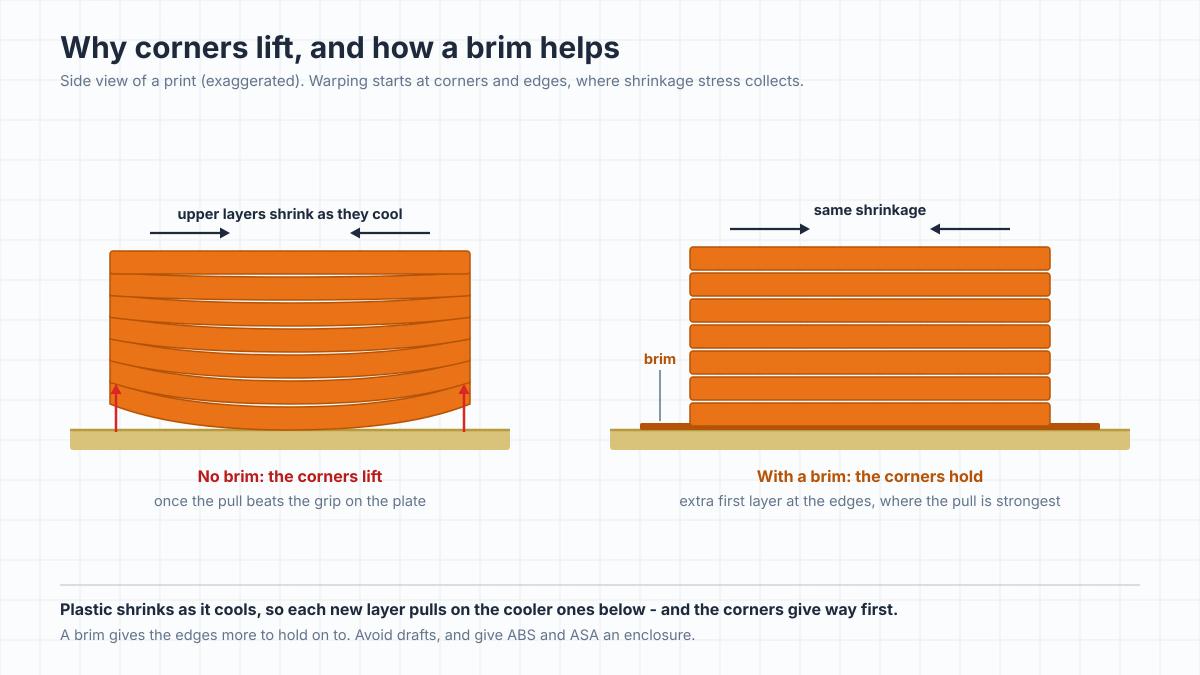
Warping is a different problem. The first layer sticks, but as the print grows, the corners peel up. The cause is shrinkage: plastic contracts as it cools, and each new layer pulls on the cooler layers beneath it. The stress collects at corners and edges, and once it's stronger than the bond to the plate, the corners lift.
How much a material shrinks decides how much it warps. Creality rates PLA as low risk, PETG as medium, ABS as high and nylon as very high. That's why ABS and ASA struggle on open printers, while PLA usually warps only on large, flat parts. ABS and ASA bed adhesion problems are mostly warping problems, so the fixes below matter more than any glue.
What helps:
- A brim. A few loops of extra first layer around the part give the corners more to hold on to. Some slicers can also add small round brim "ears", also called mouse ears, just at the corners, which are quicker to trim off.
- No drafts. An open window, a fan or an air-conditioning vent cools one side of the print faster than the other.
- An enclosure for ABS and ASA. Keeping the air around the part warm slows the shrinkage. ABS and ASA also give off fumes while printing, so the room still needs ventilation, or the enclosure a carbon filter; our ABS guide covers both.
- A slightly warmer bed, within the limits above, so the bottom layers don't cool as fast.
If you're designing the part yourself, rounded corners lift less than sharp ones.
When prints stick too well
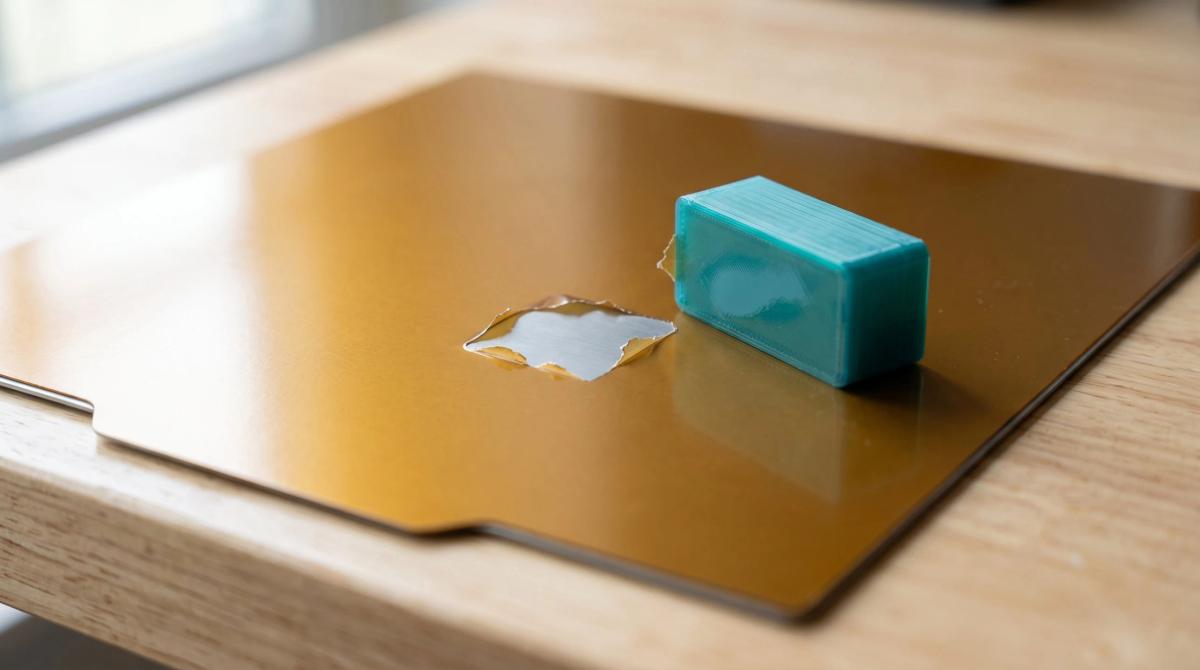
Sometimes the bond is too strong. PETG and TPU can grip smooth PEI so hard that removing the print tears a piece out of the coating. The material itself is covered in our PETG guide; here, the fixes are all about the plate:
- Use a textured plate. Prusa calls its textured sheet ideal for PETG and flexible filaments, and prints release from it once it cools.
- Add a release layer on smooth PEI. A thin layer of glue stick sits between the print and the plate (more on glue below).
- Expect more grip after an alcohol wipe. Alcohol leaves smooth PEI so clean that PETG bonds to it very strongly, Prusa notes, so a freshly wiped plate needs the glue layer most.
- Let the plate cool. Most prints come off a cool plate far more easily, and many release on their own.
- Flex gently. Bend a flexible steel plate just enough to pop the print, because a smooth PEI coating can tear. Don't use metal scrapers on a textured plate; a plastic one won't scratch it. Whatever the scraper, push it away from your hand.
If a print is still stuck after the plate has cooled, don't force it. Polymaker suggests taking the plate off and putting it in the freezer for 5-10 minutes, wrapped in a plastic bag to keep condensation off, then working a plastic scraper in slowly from a corner.
TPU behaves the same way on smooth PEI; for the plate setup that suits it, see our TPU guide.
Glue stick and other 3D printer adhesives: what they actually do
Glue stick is the most common glue for a 3D printer bed, and it solves two opposite problems. It gives a slick surface, such as bare glass, something for the first layer to hold on to, while on a surface that grips too hard, such as smooth PEI with PETG, it forms a thin separation layer that protects the plate. Prusa's documentation describes both roles.
Which plates need it depends on the plate maker. Bambu Lab, for example, requires glue on its Engineering Plate, recommends it on smooth PEI for everything except PLA, and says its textured PEI plate usually needs none. Prusa says PLA doesn't need glue on its sheets, while Bambu Lab's original Cool Plate, a low-temperature plate, calls for glue even with PLA; its newer Cool Plate SuperTack is built to grip PLA and PETG at low bed temperatures. Check your plate's instructions; Bambu Lab also discourages third-party glues on its plates.
Apply a thin, even layer. Most glue sticks made for printing wash off with warm water and a drop of dish soap.
Hairspray, painter's tape and similar tricks date from the days of bare glass beds. On a PEI plate you rarely need them, and spraying anything near the printer coats more than just the plate.
Models that are hard to keep down
Some models fight the plate whatever you do:
- Small footprints and tall, thin shapes. Very little first layer holds up a lot of height, and the nozzle can knock them loose.
- Large flat parts. More area means more shrinkage pulling on the edges.
- Sharp corners. That's where warping starts.
Orient the model so its largest flat face sits on the plate; most slicers can do this for you. Add a brim for small or tall parts. Miniatures are a classic case of a tiny footprint, so orientation and supports matter even more for them; see our FDM miniature guide.
A raft, a full printed platform under the part, is rarely needed on modern PEI plates and leaves a rough underside, so save it for cases where nothing else works. For very tall models, splitting them into parts that print lying down can be more reliable than fighting the plate.
Frequently asked questions
Why won't my PLA stick to the bed?
Usually it's a dirty plate, a first layer that's too high or a bed that's too cool. Clean the plate with isopropyl alcohol, check that the first-layer lines are slightly flattened and touching, and use a bed temperature of about 50-60°C. PLA doesn't need glue on a PEI plate.Does glue stick help bed adhesion?
It can, depending on the plate. On bare glass or another low-grip surface it gives the first layer something to hold; on smooth PEI with PETG or TPU it does the opposite job, as a release layer that protects the plate. Use a thin, even layer and follow your plate maker's advice.Should I use a brim or a raft?
Start with a brim. It adds contact area around the edges and comes off cleanly. A raft puts the whole part on a printed platform and leaves a rougher underside, so it's a last resort on modern plates.How do I clean a PEI build plate?
Wipe it with 90% or stronger isopropyl alcohol once it's cold, and wash it with warm water and plain dish soap when prints start failing; on a textured plate, washing removes oil better than alcohol. Never use acetone on a textured or satin PEI plate, and avoid hand sanitizer, lotion or anything else made for skin.Why does PETG stick too well to my bed?
PETG bonds very strongly to smooth PEI, especially right after the plate has been cleaned with alcohol. Use a textured plate or a thin layer of glue stick as a release layer, and let the plate cool before removing the print.Does a hotter bed always improve adhesion?
No. Raising the bed 5-10°C can help a material that's lifting, but too much heat softens the bottom layers. For PLA, going past about 65-70°C tends to cause more problems than it solves.Do I need to level the bed if my printer has auto leveling?
Usually not by hand. Auto leveling maps the plate and compensates for small tilts and dips, but it can't fix a badly tilted bed. The Z offset still has to be right and the plate still has to be clean, so if the first layer looks wrong, check those first.Do I need an enclosure for good bed adhesion?
Not for PLA, PETG or TPU. For ABS and ASA, an enclosure is the main defense against warping, because it keeps the air around the print warm and free of drafts.
About the author
Written by
Ethan MillerI’m a 3D printing specialist with a background in mechanical design and hands-on experience with FDM 3D printing. I focus on filament selection, slicer settings, print optimization, and troubleshooting common printing issues. I enjoy testing different materials and printing techniques and sharing practical guides that help makers get more consistent and reliable results from their printers.