What is a STEP file? What's inside, what opens it and how to print it

Some model downloads come with a file ending in .step or .stp next to the STL. A STEP file is the format CAD programs use to share a design with exact geometry: true circles, arcs and flat faces instead of the triangles an STL is made of. You can print one directly in some slicers, open it for free in several programs, and use it to change a model in ways an STL makes hard. Here's what's inside one, how it differs from STL, which free programs open it and how it behaves in your slicer.
What a STEP file is
STEP stands for Standard for the Exchange of Product model data, published as ISO 10303. It's a neutral format: a part designed in one CAD program can be saved as STEP and opened in another, without either program needing to know the other's own file type. That's why engineers, machine shops and designers who sell printable parts use it to pass designs around.
The .step and .stp extensions are the same format. Which one you get depends only on the program that saved the file.
STEP comes in several application protocols, which set what a file can carry. Older files are usually AP203 or AP214. AP242 is their successor and the current choice for CAD data, and it adds things like dimensions and tolerances attached to the model. For printing, the protocol rarely matters, since slicers and CAD programs read the shape from all common STEP files.
What a STEP file doesn't keep is the design history. The sketches, dimensions and feature steps that built the part stay in the original CAD file, so a STEP is edited by working on its faces rather than by changing a sketch.
What's inside a STEP file
A STEP file is plain text. Open one in a text editor and the first line reads ISO-10303-21;, followed by a header that names the file, the program that wrote it and the protocol it follows. Below that comes a long list of numbered entries, such as #14=MANIFOLD_SOLID_BREP('SpeedTestStructure',#11669);, each pointing to others by number.
Those entries describe the part as a boundary representation: solids made of faces, faces bounded by edges, and every face and edge defined by exact geometry. A hole is a cylinder with a radius, and a rounded corner is an arc, not a ring of small flat facets.
The file can also carry:
- Units. The file says whether its numbers are millimeters, inches or something else, so the part opens at the size it was drawn.
- Names and assemblies. A multi-part design keeps its parts as separate, named bodies and records where each part sits in the assembly.
- Colors and layers. Most current STEP exports can store them, though not every program reads them.
STEP vs STL
An STL file stores only triangles. Here's how the two compare for someone printing models:
| STEP | STL | |
|---|---|---|
| Geometry | Exact curves and surfaces | Flat triangles that approximate curves |
| Units | Stored in the file | Not stored - slicers assume millimeters |
| Parts | Separate named bodies and assemblies | No named parts - everything is one mesh |
| Colors | Possible, but the slicers covered here ignore them | Not supported |
| Editing | Precise CAD edits on faces | Mesh tools, or conversion to a solid first |
| In your slicer | Opens in some slicers and is converted to a mesh | Opens in every slicer |
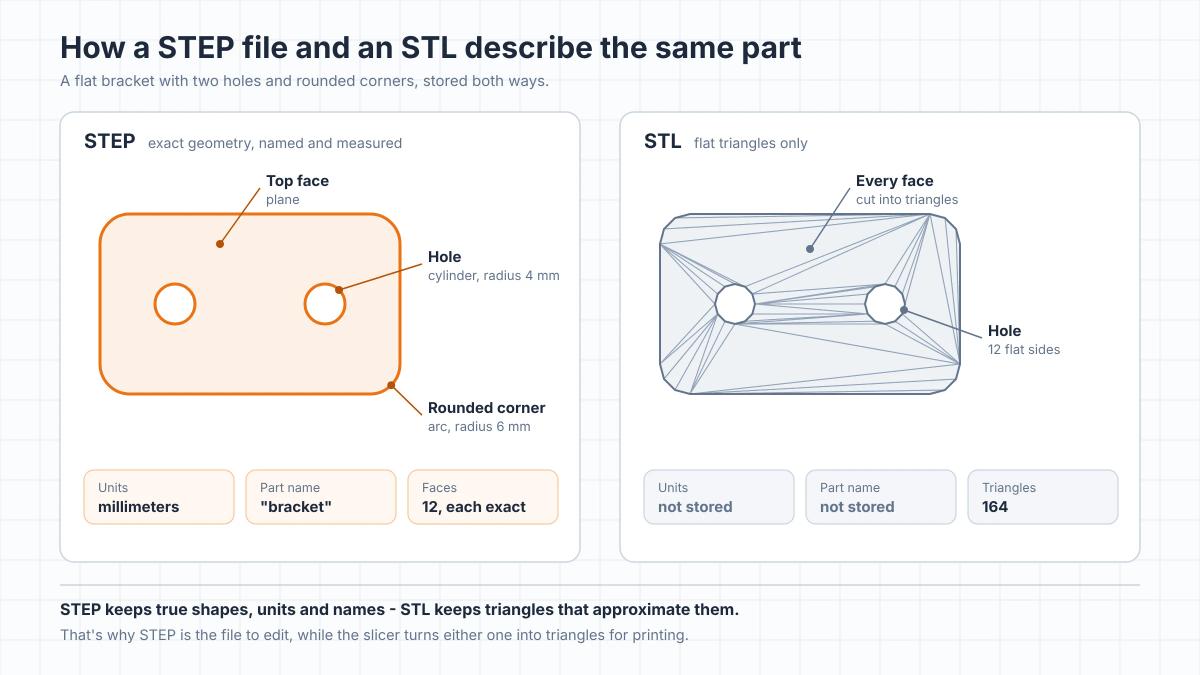
For printing, STEP gives you one small advantage: you choose how finely the slicer turns the curves into triangles. After that it prints like any mesh. Its real value is in editing: a STEP lets you resize a hole or move a wall exactly, where an STL gives you a cloud of triangles to work around.
If a download has both, print the STL or 3MF the designer provided, since that's usually the version they tested and oriented, and keep the STEP for changes.
Can you 3D print a STEP file?
Yes, if your slicer opens it. Bambu Studio, OrcaSlicer and PrusaSlicer all import STEP and convert it into a mesh on import, and from there it prints like any other model. Because the file stores its units, a part drawn in inches comes in at the right size, as long as the program that saved it recorded the units correctly - something an STL can't promise. Colors saved in the STEP don't come across, so assign filaments in the slicer.
Bambu Studio and OrcaSlicer
Open the file with File > Import > Import 3MF/STL/STEP/SVG/OBJ/AMF, or drag it onto the plate. A dialog then asks how finely to convert the curves into triangles. Its two settings, Linear Deflection and Angle Deflection, control how far the mesh may stray from the true surface, and the dialog shows how many triangles the result will have. Smaller values give smoother curves and more triangles, and take longer to process. The default is fine for most prints. If you tick Don't show again, the dialog stops appearing until you turn it back on in the preferences.
The same dialog has an option to split compound and compsolid shapes into multiple objects, which you can usually leave off. By default, an assembly comes in as one object made of several parts, each named after its part in the STEP file, so you can give each part its own filament. To print the parts side by side instead, right-click the object and choose Split > To objects.
PrusaSlicer
Open the file with File > Import > Import STL/3MF/STEP/OBJ/AMF. PrusaSlicer asks for the STEP import quality: Low, Medium, High or Custom. Low is selected the first time and already keeps the mesh within a few thousandths of a millimeter of the true surface, finer than an FDM printer can reproduce. After that, the dialog remembers your last choice. Higher settings mainly make the mesh larger and slower to process. If you import several STEP files at once, Apply to all uses the same choice for each, and Remember my choice skips the dialog next time.
UltiMaker Cura
Cura doesn't open STEP files out of the box. UltiMaker has offered a CAD import plugin that reads STEP, but only for its paid subscription plans, so if you see one in the Marketplace, it won't work on the free version. Open the STEP in a CAD program or another slicer and export an STL or 3MF, then load that into Cura.
Whichever slicer you use, two things are worth checking after import. Parts come in where they sit in the assembly and in the orientation they were drawn, which is rarely how they should print, so lay each part on its flattest face before slicing. And if Bambu Studio warns about an unclosed shell, the STEP holds surfaces rather than a closed solid and needs fixing in CAD before it will print reliably.
What opens a STEP file for free
You don't need paid CAD software to look at, print or edit a STEP file:
- Your slicer. Bambu Studio, OrcaSlicer and PrusaSlicer open STEP for printing. They can't save STEP, only mesh formats.
- FreeCAD. A free, open-source CAD program that opens STEP, lets you measure and edit the part and exports STEP, STL and 3MF. Unlike the slicers covered here, it also reads the part names, assembly structure and colors saved in the file.
- Autodesk Fusion. The free personal-use license opens and exports STEP and has the tools to change a part's faces accurately. It's for non-commercial projects only, and your designs are stored in Autodesk's cloud.
- Onshape. A browser-based CAD program with a free plan, but that plan is for non-commercial use and every document on it is public. Don't upload a model you bought there, since anyone could find it.
- Autodesk Viewer. A free online viewer for looking at a STEP file without installing anything. The file is uploaded to Autodesk's servers to be displayed and is kept online for 30 days.
Blender doesn't open STEP files on its own and needs a third-party add-on, so it's not the tool for this format.
Why designers include STEP files
A designer who adds a STEP file to a download is giving you the part in a form you can change accurately. With the STL you can scale a model or cut it, but making one hole 0.2 mm bigger, thickening a wall or adding a mounting tab is slow mesh work. With the STEP, you open it in FreeCAD or Fusion, select the face and change it. Our guide to editing STL files shows how much harder the same job is on a mesh.
That makes STEP files especially useful for functional parts: brackets, enclosures, adapters and anything that has to fit hardware you already own. If a model you need only comes as an STL, turning it into a STEP yourself won't bring the curves back, as our guide to converting STL to STEP explains.
Treat the STEP file like the designer's source file. Even when the license lets you print and modify the model, sharing or re-uploading the STEP itself is usually not allowed, so check the license before you share or sell anything you've changed. Some designers sell STEP files separately or under different license terms.
How to turn a STEP file into an STL or 3MF
If you need a mesh file, for Cura or for another program, the quickest route is your slicer. Import the STEP in Bambu Studio, OrcaSlicer or PrusaSlicer and export it as STL or 3MF, the same way our guide to converting 3MF to STL describes.
From CAD, use the program's STL or 3MF export and check its resolution setting, often called deviation or chordal tolerance, which sets how closely the triangles follow curves. Our guide to making an STL file covers those export settings. A 3MF keeps the units and can keep separate parts in one file - our explainer on what a 3MF file is covers the rest.
Frequently asked questions
What is the difference between STEP and STP files?
There is none. .step and .stp are two extensions for the same ISO 10303 format, and every program that opens one opens the other. The extension depends only on the program that saved the file.What programs open STEP files?
CAD programs open STEP files, including free ones such as FreeCAD and Autodesk Fusion for personal use. For printing, Bambu Studio, OrcaSlicer and PrusaSlicer open STEP directly and convert it into a mesh. To only look at a file, a free online viewer such as Autodesk Viewer works without installing anything.Can Cura open STEP files?
Not on the free version. UltiMaker Cura opens mesh formats such as STL, 3MF and OBJ, and STEP import has only been offered as a plugin for paid UltiMaker subscriptions. Convert the STEP to STL or 3MF in a CAD program or another slicer first, then open that file in Cura.Is STEP better than STL for 3D printing?
Not for the print itself: a slicer turns a STEP into triangles, so the printed part is the same. STEP is better for editing, because it keeps exact geometry and units, which makes precise changes to holes, walls and fit easy in CAD software.Can Blender open STEP files?
Not on its own. Blender works with meshes and needs a third-party add-on to import STEP. For STEP files, a CAD program such as FreeCAD or a slicer that imports STEP is the better tool.Does a STEP file store color?
It can. Most current STEP exports can store colors, and CAD programs such as FreeCAD read them. Bambu Studio, OrcaSlicer and PrusaSlicer ignore them when they import the file, so you assign filament colors in the slicer as usual.Can I edit a STEP file?
Yes, in a CAD program. FreeCAD or Autodesk Fusion opens the part as a solid you can measure and change by moving, offsetting or cutting its faces. You won't get the original sketches and feature history, because STEP doesn't store them.
About the author
Written by
Ethan MillerI’m a 3D printing specialist with a background in mechanical design and hands-on experience with FDM 3D printing. I focus on filament selection, slicer settings, print optimization, and troubleshooting common printing issues. I enjoy testing different materials and printing techniques and sharing practical guides that help makers get more consistent and reliable results from their printers.