What is a 3MF file? What's inside and what opens it

A 3MF file (short for 3D Manufacturing Format) is a 3D model file designed for 3D printing and other additive manufacturing. It's a ZIP archive of XML files that stores a part's shape and its measurement units, and it can also carry colors, several parts arranged on a build plate and a preview thumbnail. Saved from a slicer as a project, a 3MF also packs in printer, filament and process settings. What actually loads when you open one depends on how the file was saved and which program opens it.
What a 3MF file is
3MF often sits next to STL on model download pages, and the format goes back to 2015. That year the 3MF Consortium - founded by Microsoft, Autodesk, Dassault Systèmes, HP, Shapeways, SLM Solutions and FIT - set out to fix the blind spots of older mesh formats. The consortium now runs as a Joint Development Foundation project under the Linux Foundation, and its specification is open for anyone to read and build software around. In June 2025 it also became an international standard, ISO/IEC 25422:2025.
The specification is split into a core and optional extensions. The extensions cover things like materials and colors, splitting a model across several files for production, lattice structures and slice data.
At the core level, a 3MF stores more context than an STL file, which lists raw triangles with no units:
- Shared-vertex meshes. Every corner point is written once, and triangles refer to it by number instead of repeating it for every triangle that touches it.
- Explicit units. A unit attribute says whether the numbers are microns, millimeters, centimeters, inches, feet or meters. The default is millimeters, so software that follows the specification opens the part at the size it was saved.
- Multiple objects and their layout. One file can hold many separate parts, each with the position and rotation it had on the build plate.
- Metadata and thumbnails. Standard fields record the title, designer, description, copyright, license, creation date and the program that made the file, and a PNG or JPEG thumbnail can serve as a preview.
A common myth is that 3MF files are automatically error-free. The core specification does require model meshes to be closed - every edge shared by exactly two triangles, with consistent orientation and outward-facing normals - and tells software not to write files that break those rules. Whether a file actually follows them is up to the program that exported it. A tool that writes a broken mesh still produces a 3MF, which is why your slicer checks and repairs 3MF geometry just as it does with STL.
What's inside a 3MF file
A 3MF is a standard ZIP archive built on the Open Packaging Conventions, so you don't need special tools to look inside. Make a copy of the file, change its extension from .3mf to .zip and extract it. The model and settings files inside are plain text, so any text editor opens them, though a large model file can be slow to scroll through.
Every 3MF has three core parts, and most add a thumbnail:
- [Content_Types].xml tells the reading program what kinds of files the package contains.
- _rels/.rels points to the main model file and, if there is one, the thumbnail.
- 3D/3dmodel.model is the XML model: a resources section with the vertices, triangles, color groups and objects, and a build section that places each object on the plate.
- A thumbnail is optional. PrusaSlicer saves it as Metadata/thumbnail.png, while Bambu Studio writes plate previews such as Metadata/plate_1.png.
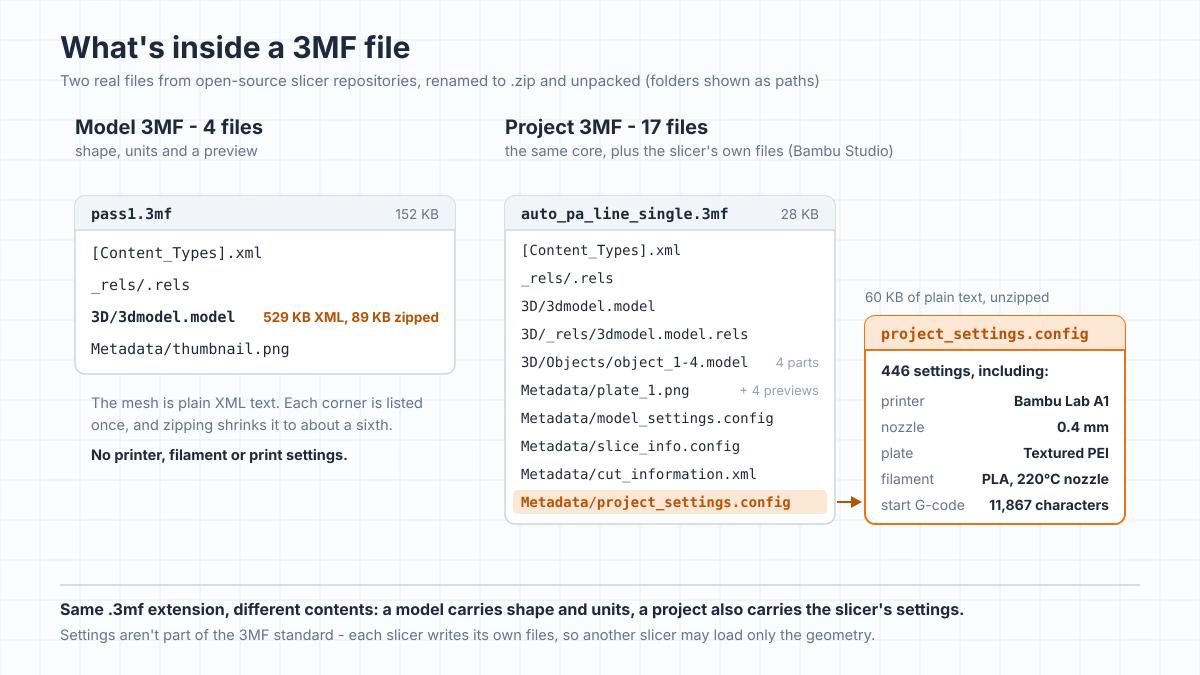
To see how much real files vary, we unzipped calibration files that ship in two open-source slicer repositories:
- A simple model 3MF (pass1.3mf from the OrcaSlicer repository, 152 KB): just four files - 3D/3dmodel.model, Metadata/thumbnail.png, [Content_Types].xml and _rels/.rels. The XML model is 529 KB, and compression shrinks it to 89 KB inside the archive, about a sixth of its size. A much larger model in the same repository (OrcaSliced.3mf) compresses about as well: 20.1 MB of XML takes up 3.2 MB.
- A slicer project (auto_pa_line_single.3mf from the Bambu Studio repository, 28 KB): 17 files. Instead of keeping the mesh in the main model file, it uses the Production extension to store each part in its own file under 3D/Objects/. The Metadata/ folder holds plate previews, model_settings.config, slice_info.config and project_settings.config. That last file is 60 KB and holds 446 settings: a Bambu Lab A1 printer with a 0.4 mm nozzle, a textured PEI plate, filament temperatures and flow ratios, and nearly 11,900 characters of start G-code.
To find out which program wrote a 3MF before you open it in a slicer, open 3D/3dmodel.model in a text editor and look at the first few lines. Most slicers add a metadata line named Application with the program's name and version. Not every file has one, though: the simple calibration file above doesn't.
Model 3MF vs project 3MF
Two quite different things share the .3mf extension: a model and a whole slicer project.
A model 3MF holds the geometry, units, part layout and, optionally, colors or materials. It loads onto your plate without touching your printer, filament or process settings. Many model downloads are this kind.
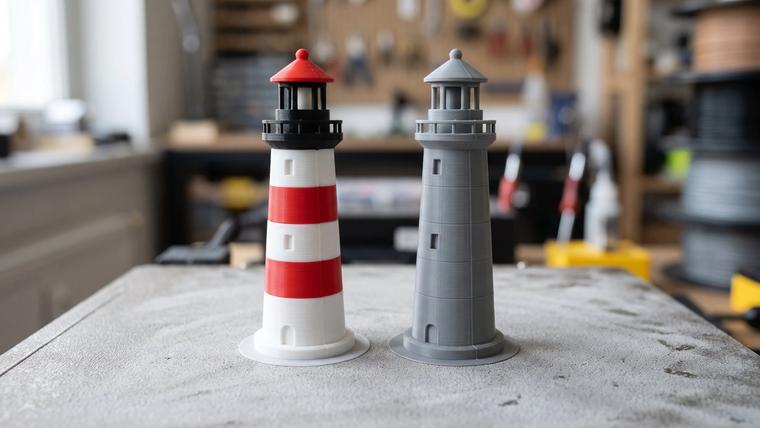
A project 3MF is what a slicer writes when you save a project. Alongside the mesh, it stores the active print settings, modifiers and support blockers, filament profiles and the printer profile. Painted color regions can travel in a 3MF too, which matters for multicolor printing with an AMS or another multi-material system: the colors arrive already assigned. Our 3MF vs STL comparison covers when each format is the better download.
Print settings aren't part of the 3MF standard. It has no shared fields for infill, retraction or nozzle temperature, so every slicer family keeps its settings in its own files inside the archive:
- PrusaSlicer: print, filament and printer settings in Metadata/Slic3r_PE.config, and per-object settings and modifiers in Metadata/Slic3r_PE_model.config.
- Bambu Studio and OrcaSlicer: project settings in Metadata/project_settings.config, per-object settings and the plate layout in Metadata/model_settings.config, and slicing information in Metadata/slice_info.config.
- UltiMaker Cura: a Cura/ folder with profile .cfg files, preferences.cfg and a few JSON files.
Model sites built around one slicer often offer "print profiles" - project 3MFs saved in that slicer and set up for a particular printer.
Why a 3MF opens without its settings (or with someone else's printer)
Because each slicer keeps its settings in its own files, the same 3MF can open very differently depending on the program. We checked how the major slicers handle this in their source code, and the rule is simple: settings load in the slicer that saved them, or in a close relative built on the same code.
- From Bambu Studio to OrcaSlicer. OrcaSlicer is a fork of Bambu Studio and uses the same settings files. It opens a Bambu Studio project with its printer, filament and process presets, swapping any values it doesn't recognize and noting the changes in its log rather than on screen.
- Between slicer families. A PrusaSlicer project opened in Bambu Studio or OrcaSlicer loads as geometry only, with a notice saying so. PrusaSlicer reads settings only from its own Slic3r_PE.config, and Cura only from its Cura/ folder.
- What still carries over. Geometry split across several files loads in all four slicers. Colors travel better than settings: Bambu Studio keeps the colors from 3MF files that carry no slicer settings, such as exports from CAD tools, and PrusaSlicer reads the regions painted in Bambu Studio.
If your plate already has models on it when you open or drop in a 3MF, Bambu Studio and OrcaSlicer ask whether to open it as a project or import the geometry only. PrusaSlicer asks when you drag a project onto its window, offering Open as project, Import 3D models only or Import config only. In both PrusaSlicer and Bambu Studio, the Import command in the File menu brings in the geometry alone.
Opening someone else's file as a project replaces your printer, nozzle, filament and plate selection with the author's. If the project was saved for a Bambu Lab A1 with a textured PEI plate and you print on another machine or a smooth plate, switch the printer preset and check the plate type before slicing. Bambu Studio also warns before sending a job if the printer type used for slicing doesn't match the printer you've selected.
There's a safety side too. Project files carry the printer's and filament's custom G-code, including the start and end sequences. When those have been modified, Bambu Studio lists them and asks you to confirm they're safe for your machine. For a 3MF from an author you don't know, importing the geometry only and slicing with your own profiles is the safest choice.
Sliced 3MF files (.gcode.3mf)
In Bambu Studio and OrcaSlicer you may also come across a double extension: .gcode.3mf. It's what you get from Export plate sliced file or Export all plate sliced file, and it's the same kind of file Bambu Studio sends to the printer when you start a print.
Despite the .3mf ending, it isn't a model file. When the slicer exports a sliced plate, it packs the finished G-code (Metadata/plate_1.gcode with an .md5 checksum), plate previews and slicing information, and leaves out the editable mesh. Unzip one and there's no model to recover.
That gives a .gcode.3mf the same limits as plain G-code:
- It's tied to the printer model, nozzle, plate type and filament settings it was sliced with.
- You can't scale it, rotate parts, change supports or export an STL from it.
- For a different printer, go back to the download page and get the unsliced 3MF or STL.
Our guide to how slicing turns a model into G-code explains why toolpaths can't be turned back into a model.
How to open a 3MF file
Whether you want to slice a part, edit its mesh or just see what's inside, you have several options:
- Slicers (free, for Windows, macOS and Linux): Bambu Studio, OrcaSlicer, PrusaSlicer and UltiMaker Cura open both simple 3MF models and multi-object projects.
- CAD programs: Autodesk Fusion, FreeCAD, SolidWorks, Rhino, PTC Creo and CATIA import 3MF, but as a triangle mesh rather than an editable solid. Our guide to editing STL files covers mesh workflows that work the same way for 3MF.
- Blender: 3MF isn't built in, but the free 3MF format add-on from the official Blender Extensions platform imports and exports it.
- A web browser: open-source tools such as Online 3D Viewer (3dviewer.net) let you drop in a .3mf and turn the parts around without installing anything.
Skip the old Windows apps. Many guides still suggest 3D Builder, Paint 3D or 3D Viewer, but Microsoft has removed all three from the Microsoft Store - 3D Builder and Paint 3D in 2024, 3D Viewer in July 2026 - so they can no longer be installed from there.
If an older program refuses to open a new 3MF, one common reason is the specification's rule on required extensions. A file can mark an extension as required - Bambu Studio projects mark the Production extension this way - and a program that doesn't support it isn't allowed to process the file. A current version of any of the four slicers above will usually open it.
Once the file is open in a slicer, converting 3MF to STL takes a few clicks through the export menu. The STL keeps the mesh but loses the colors, units, thumbnail and settings. If your files come from 3D scans or game assets, our OBJ vs STL guide covers that format too.
3MF or STL?
For a single-color, single-part print, your printer makes the same part from a 3MF or an STL. Both describe the surface with triangles, so neither makes walls smoother or parts stronger.
A 3MF is the better choice when a model has several pre-arranged parts, painted colors or slicer modifiers you want to keep together, with its units recorded. STL is the safer bet for older CAD tools, mesh repair utilities and older slicers. Our full comparison of 3MF vs STL goes through file sizes, mesh rules and when to pick each.
Frequently asked questions
Is a 3MF file better than STL?
For a simple single-color object, a 3MF prints the same as an STL, because both describe the shape as a triangle mesh. A 3MF is better when you need what STL can't store: units, several parts arranged on a plate, colors, a thumbnail and slicer settings, all in one compressed file.Can a 3D printer print a 3MF file directly?
Not a regular one. A model or project 3MF holds geometry and settings, not the movement commands a printer runs, so it has to be sliced first. The exception is a sliced .gcode.3mf from Bambu Studio or OrcaSlicer, which already contains G-code for the printer it was sliced for.Why does my 3MF open without print settings?
Print settings aren't part of the 3MF standard, so each slicer saves them in its own files inside the archive. A slicer loads settings only from its own files or those of a close relative - OrcaSlicer, for example, reads Bambu Studio projects. A slicer from another family imports the geometry and, in some cases, the colors.Why did a 3MF change my printer and filament settings?
It was opened as a project. A project 3MF carries the author's printer, nozzle, plate type and filament profiles, and opening it as a project replaces your current selection with them. To keep your own setup, bring the file in with the slicer's Import command, or choose Import geometry only (Import 3D models only in PrusaSlicer) when the slicer asks.Is it safe to open a 3MF from someone else?
Importing just the geometry is low-risk. Opening an unknown file as a full project is riskier, because its presets can contain custom start and end G-code that runs on your printer. Bambu Studio warns when a 3MF has modified G-code in its printer or filament presets. With files from unfamiliar authors, import the geometry only and slice with your own profiles.How do I open a 3MF file without a slicer?
Use a browser tool such as Online 3D Viewer (3dviewer.net), import the mesh into a CAD program such as FreeCAD or Autodesk Fusion, or open it in Blender with the free 3MF add-on from the Blender Extensions platform. You can also rename a copy to .zip and extract it to see the thumbnail and XML files.Can I convert a 3MF file to STL?
Yes, unless it's a sliced .gcode.3mf. Open the 3MF in a free slicer such as PrusaSlicer, Bambu Studio, OrcaSlicer or UltiMaker Cura, select the model and export it as STL. The STL keeps the triangle mesh but loses the colors, thumbnail, print settings and recorded units.Does a 3MF file store units?
Yes. An STL stores plain numbers without saying what they measure, while a 3MF records its unit in the model file. The default is millimeters, and microns, centimeters, inches, feet and meters are also allowed, so a part opens at the size it was saved.
About the author
Written by
Ethan MillerI’m a 3D printing specialist with a background in mechanical design and hands-on experience with FDM 3D printing. I focus on filament selection, slicer settings, print optimization, and troubleshooting common printing issues. I enjoy testing different materials and printing techniques and sharing practical guides that help makers get more consistent and reliable results from their printers.