How to dry filament: temperatures and times for PLA, PETG and more

Filament pulls water out of the air, and wet filament prints badly: it pops and hisses at the nozzle, strings between parts and leaves rough, weak layers. Drying brings most spools back. The catch is the numbers. Prusa, Bambu Lab and UltiMaker each publish drying temperatures for the same plastics, and they don't agree, sometimes by tens of degrees. This guide puts their numbers side by side, explains what to follow first, compares the ways to dry a spool at home and covers how to keep it dry afterward.
Does your filament need drying?
Prusa says the first sign is usually a poorer surface on the model, and that wetter filament adds weak layer adhesion, blobs, and bubbling and smoke as it leaves the nozzle. Bambu Lab lists stringing, missing material, holes, rough surfaces and lower strength, and UltiMaker adds a popping sound and a milky look in transparent nylon or PVA. Stringing that no slicer setting can cure is a common sign too, which is why our guide to retraction settings puts drying first among the fixes to try before you touch retraction.
Some materials need drying far more often than others. Prusa singles out nylon, PVA and TPU as needing it more often than PLA. PETG also takes up moisture faster than PLA, while PLA is fairly tolerant, but not immune.
A sealed new spool is often ready to print. Polymaker, for one, dries its filament before shipping, vacuum-seals it with a desiccant pack and says it's ready to print straight out of the bag for most users, as long as the seal is intact. Bambu Lab is more cautious: it recommends drying PLA and PETG before use and lists drying as required for TPU, PC, nylon and PVA. If you're not sure whether a spool is dry, Bambu's advice is to dry it before printing.
Drying temperatures and times by material
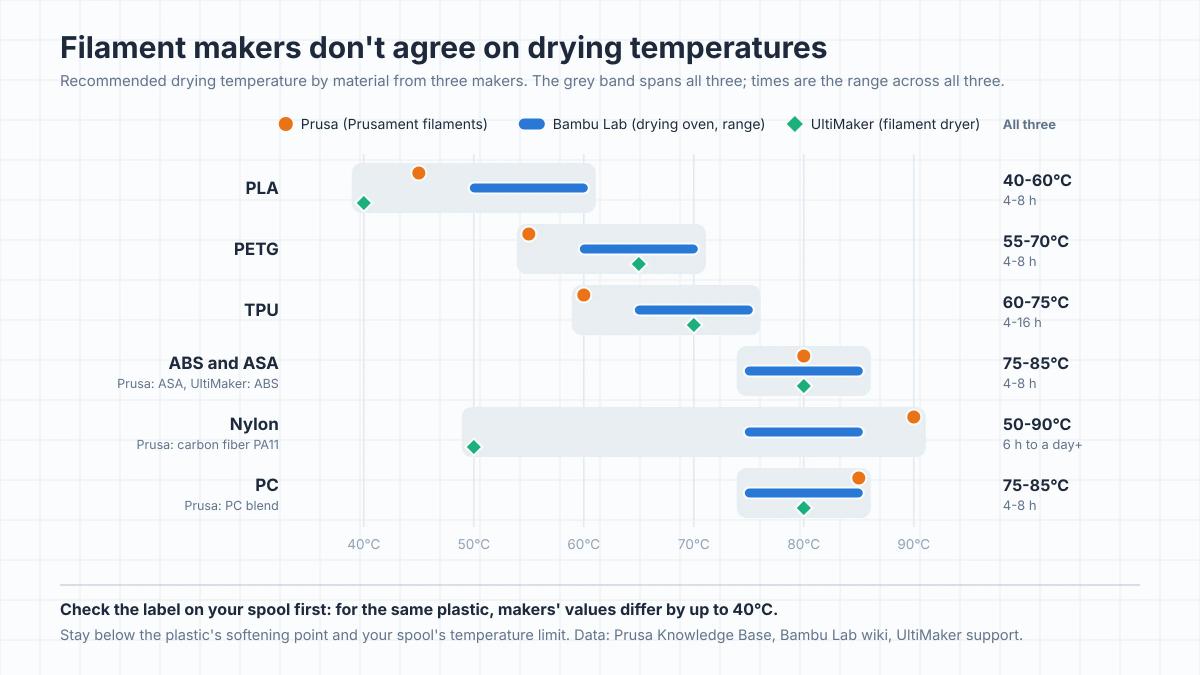
Start with the label on your spool or the maker's data sheet. Formulations differ, and the company that made your filament knows its own material best. If the label says nothing, here's what three printer and filament makers publish:
| Material | Prusa | Bambu Lab | UltiMaker |
|---|---|---|---|
| PLA | 45°C, 6 h | 50-60°C, 8 h | 40°C, 4-8 h |
| PETG | 55°C, 6 h | 60-70°C, 8 h | 65°C, 4-8 h |
| TPU | 60°C, 4-6 h | 65-75°C, 8 h | TPU 95A: 70°C, 4-16 h |
| ABS and ASA | ASA: 80°C, 4 h | 75-85°C, 8 h | ABS: 80°C, 4-8 h |
| Nylon | Carbon fiber PA11: 90°C, 6 h | 75-85°C, 8-12 h | 50°C, 24 h or more |
| PC | PC blend: 85°C, 5 h | 75-85°C, 8 h | 80°C, 4-8 h |
Prusa's values are for its Prusament filaments, Bambu Lab's for a forced-air drying oven and UltiMaker's for a filament dryer. US ovens and many dehydrators are marked in Fahrenheit: 40°C is 104°F, 50°C is 122°F, 60°C is 140°F, 70°C is 158°F, 80°C is 176°F and 90°C is 194°F, and each 5°C step in between adds 9°F.
The spread is wide: 40-60°C for PLA, 55-70°C for PETG, and anywhere from 50°C for a day or more to 90°C for six hours for nylon. Prusa's 90°C is for its carbon fiber PA11, and its nylon guide's general advice is at least 4 hours below 90°C. Part of the spread is the materials themselves and part is the equipment each maker has in mind. Bambu Lab, for example, gives PLA 45-55°C in its AMS 2 Pro dryer but 50-60°C in a drying oven. For a first try, pick a value from the lower half of the range, and if the spool still isn't dry, give it more time before you raise the heat, staying within the times the makers list. Prusa notes that high temperatures damage filament even when you shorten the drying time.
Whichever number you pick, two limits apply. The first is the plastic's softening point. UltiMaker says to stay below the glass transition temperature, where the plastic starts to soften, and PLA starts to soften at around 60°C. Prusa warns that filament dried past its limit will soften and stick together on the spool. The second is the spool itself. Prusa rates its older black spools, whose plastic sides are pressed onto a cardboard core, for only 45°C unless a screw holds the sides together, and its newer black spools for 90°C, while UltiMaker's polypropylene spools can soften at around 80°C. If you dry hot, check what your spool can take.
Ways to dry filament compared
Filament dryer
A dedicated dryer is the method UltiMaker says gives the best results, because it holds the filament at a set temperature for a set time. Prusa describes these boxes as keeping filament dry and actively removing moisture, and notes that you can usually leave the spool inside while it prints. Before you buy one for engineering materials, check its maximum temperature, because ABS, PC and most makers' nylon need 75°C or more.
Your printer's dryer or heated bed
Some multi-material units can dry the spools they hold. Bambu Lab's AMS 2 Pro, for example, reaches up to 65°C, which Bambu lists as enough for PLA and PETG but not enough to fully dry hotter materials such as ABS, PC and nylon. Bambu's AMS pages say a unit can't dry while it's feeding the current print, although newer Bambu software and firmware let some printers dry during a print at a lowered temperature. For a thorough job, dry before you start. Our AMS explainer covers how these units work.
Without a dryer, an enclosed printer's heated bed can do the job slowly. Bambu Lab gives this method for its enclosed X1 and P1S printers: lay the spool flat on the bed, cover it with the filament box or a printed PC box, keep the lid and door shut and leave it for about 12 hours, turning the spool over every 6 hours. These are bed settings, and they run higher than Bambu's oven values for the same filament - 65-75°C for PLA against 50-60°C in a drying oven - so don't carry them over to a dryer or an oven, and don't use them on an open-frame printer. UltiMaker calls the build plate the next best option after a dryer: the humidity isn't controlled, so it typically takes longer and needs a higher temperature.
Food dehydrator
A food dehydrator with an adjustable thermostat is the usual DIY filament dryer. Prusa's caution is that dehydrators usually only reach low temperatures, so check that yours goes as high as your filament needs: that can be fine for PLA, but often not for the hotter materials in the table. Round dehydrators usually need their trays removed or a spacer ring added to fit a spool, and printable spacers for exactly that are a popular DIY project. Take the spool out of its bag and packaging before it goes in.
Oven
An oven is the method makers are least keen on. Bambu Lab doesn't recommend a kitchen oven because its heat is highly uneven, with spots near the heating elements hot enough to damage both the spool and the filament. Prusa adds that home ovens don't measure temperature precisely, that many can't be set low enough for filament, and that too much heat damages filament even over a short time. If you use one anyway, check the real temperature with an oven thermometer, let it settle before the spool goes in, keep the spool away from the heating elements and stay nearby.
The ovens in the makers' own guides are different machines. Bambu Lab's numbers are for a forced-air drying oven, and Prusa's guide uses a laboratory drying oven for its most demanding materials. They hold a set temperature evenly, which a kitchen oven doesn't.
What not to use
Skip the microwave: Bambu Lab lists it alongside the kitchen oven as not recommended. A hair dryer or heat gun has no thermostat to hold a drying temperature for hours. A box of silica gel doesn't count either. Desiccant keeps dry filament dry, but UltiMaker notes that storing a spool with it doesn't dry the material.
How to tell when it's dry
The time and temperature on the label are the starting point, and a test print is the quickest check: if the popping, hissing and strings are gone, the spool is dry enough. A kitchen scale that reads to the gram makes it measurable. Weigh the spool before drying and again every couple of hours. The water that comes out shows up as lost weight, and once the weight stops dropping, more time at that temperature won't help. On a cardboard spool, part of the lost weight is the cardboard drying out, so watch for the weight to level off rather than for a set number of grams.
Don't stretch the time far past the maker's figure just to be safe. Prusa advises sticking to the listed drying times to avoid over-drying.
Keeping filament dry after drying
Dried filament starts taking up water again as soon as it's back in room air. Bambu Lab says that in a typical room at around 55% relative humidity, freshly dried filament can start losing print quality within about 2-12 hours, while at 20% it stays dry for roughly 2-7 days. Its guidance is that most filaments need storage below 20% relative humidity to stay dry for long.
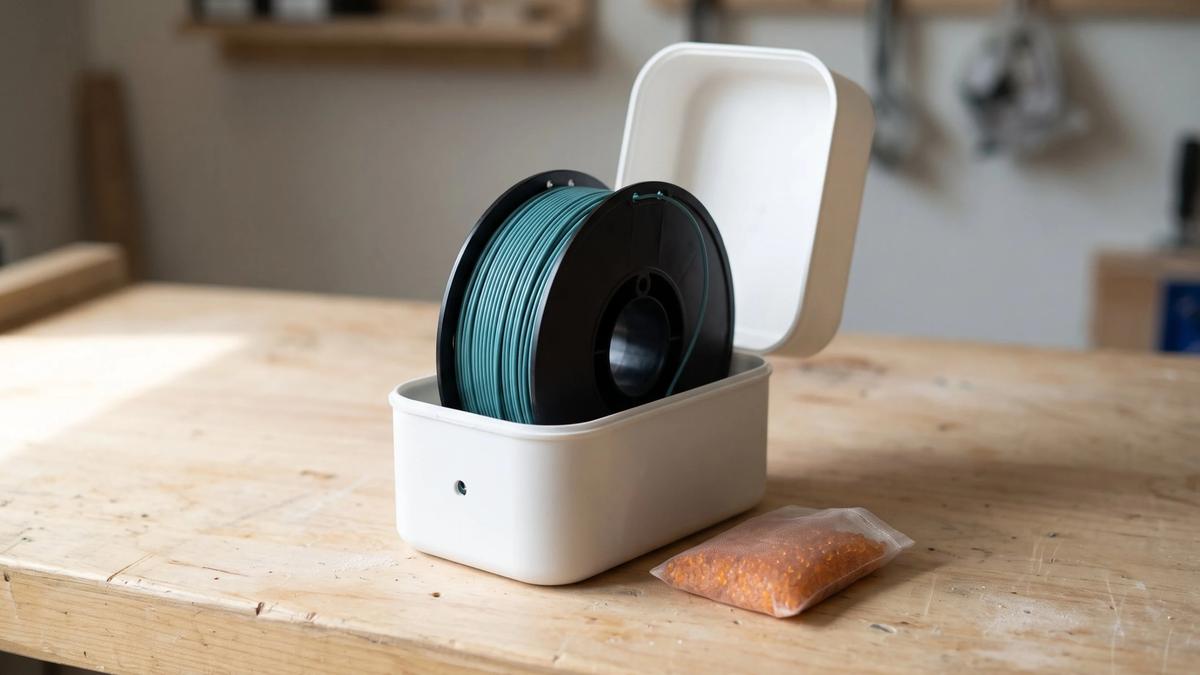
- Seal it. Prusa recommends a dry box or a vacuum bag with a desiccant pack. Bambu Lab advises checking the real humidity with a hygrometer, and one in the box also tells you when the desiccant needs replacing.
- Print from a dry box. For TPU and nylon, feed the filament from a dryer or a sealed box with desiccant while it prints - Bambu Lab lists desiccant protection during printing as required for TPU, nylon, PC and PVA. A long print can easily outlast the few hours that dried filament stays dry in room air.
- Don't count on the box to dry it. A dry box keeps filament the way it went in. If a spool is already wet, dry it first.
Frequently asked questions
What temperature should you dry PLA at?
Follow the spool's label first. Without one, makers' values run from about 40°C to 60°C: Prusa recommends 45°C for 6 hours for its PLA, UltiMaker 40°C for 4-8 hours in a dryer and Bambu Lab 50-60°C for 8 hours in a drying oven. Don't go above about 60°C, where PLA starts to soften.What temperature do you dry PETG at?
The three makers' values run from 55°C to 70°C. Prusa uses 55°C for 6 hours, UltiMaker 65°C for 4-8 hours and Bambu Lab 60-70°C for 8 hours in a drying oven. Start from the label on your spool, and check that the spool itself can take the heat.How long does it take to dry filament?
Usually 4-8 hours for common materials such as PLA, PETG and TPU, and longer for nylon: 8-12 hours on Bambu Lab's list, and from overnight to more than a day on UltiMaker's, which uses a lower temperature. A printer's heated bed is usually slower: Bambu Lab gives about 12 hours, and UltiMaker 10-20 hours or more for most materials other than PLA, because the humidity around the spool isn't controlled.Can you dry filament in the oven?
You can, but makers advise against a kitchen oven. Bambu Lab says its heat is too uneven, with hot spots near the heating elements, and Prusa warns that home ovens don't measure temperature precisely. If you use one, check the real temperature with an oven thermometer, keep the spool away from the heating elements and don't leave it unattended. A filament dryer or a forced-air drying oven is the safer choice.Can you use a food dehydrator to dry filament?
Yes, if it reaches the temperature your filament needs. Prusa notes that dehydrators usually only reach low temperatures. That can be enough for PLA, but not for materials most makers dry at 75°C or more, such as PC. You may need to remove trays or add a spacer so the spool fits.Can you over-dry filament?
Yes. Prusa advises sticking to the listed drying times to avoid over-drying, and too much heat softens filament so the windings stick together on the spool. Once a spool stops losing weight, more drying won't help.Do you need to dry new filament?
Not always. A spool that arrives vacuum-sealed with desiccant is often ready to print - Polymaker, for example, dries its filament before shipping and says it's ready straight out of the bag for most users. Moisture-sensitive materials are different: Bambu Lab lists drying before use as required for TPU, PC, nylon and PVA. If a new spool pops, strings or prints rough, dry it.How long does filament stay dry after drying?
Not long in open air. Bambu Lab says freshly dried filament in a room at around 55% humidity can start losing print quality within about 2-12 hours, while at 20% humidity it stays dry for roughly 2-7 days. Store it in a sealed bag or box with desiccant, and print moisture-hungry materials such as nylon and TPU from a dry box.
About the author
Written by
Ethan MillerI’m a 3D printing specialist with a background in mechanical design and hands-on experience with FDM 3D printing. I focus on filament selection, slicer settings, print optimization, and troubleshooting common printing issues. I enjoy testing different materials and printing techniques and sharing practical guides that help makers get more consistent and reliable results from their printers.