What is TPU filament? What it's good for and what to print with it
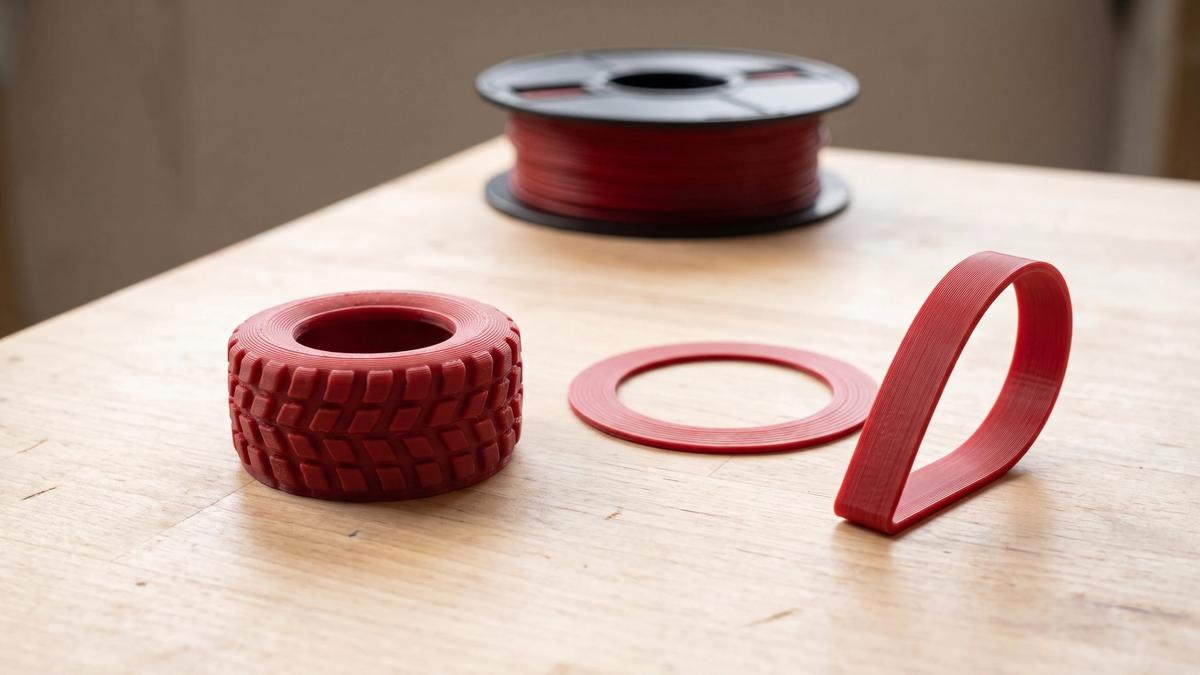

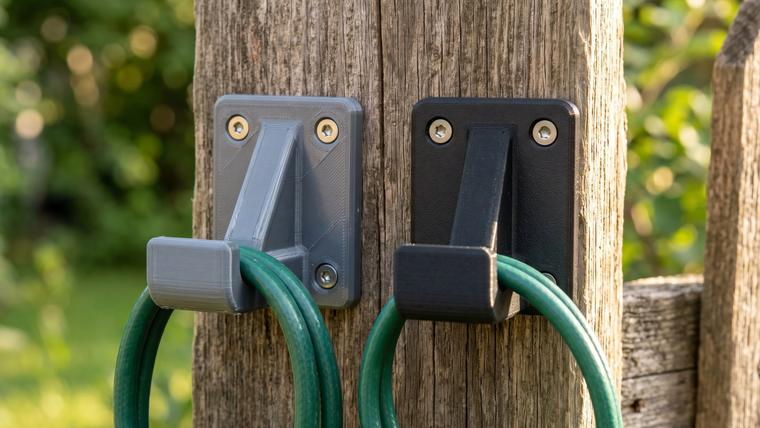
TPU (thermoplastic polyurethane) is the flexible filament: parts printed in it bend, squash and spring back instead of snapping. Ask which 3D printer filament is flexible and TPU is the usual answer. It's what people reach for when a print has to grip, seal or cushion - phone cases, gaskets, tires, straps and bumpers.
It runs on most FDM printers, but it asks more of the extruder and the settings than PLA or PETG. If you're still choosing between materials, our guide to picking filament by what you're printing compares TPU with the rest.
What TPU is (and how it relates to TPE)
TPU is built from two kinds of segments chained together: hard ones and soft ones. The soft segments let the material stretch and bend, while the hard segments cluster together and act as anchor points that pull it back into shape. The balance between the two, along with the exact recipe, sets how firm the material is: more hard segments make a firmer TPU, more soft segments a softer one. Manufacturers sell TPU grades all the way from rubber-soft to almost rigid.
Those hard clusters also melt when heated and form again when they cool. That's what makes TPU a thermoplastic: it can be melted, pushed through a nozzle and set again, which is why you can print it at all.
TPU belongs to a wider family called thermoplastic elastomers, or TPE. Filaments sold under the general "TPE" label are usually softer and more rubbery, though there's no strict line between the two names. Prusa's documentation describes TPU as a subtype of TPE and says the main practical difference is hardness, so the number on the spool tells you more than the name.
Shore hardness: what 95A actually means
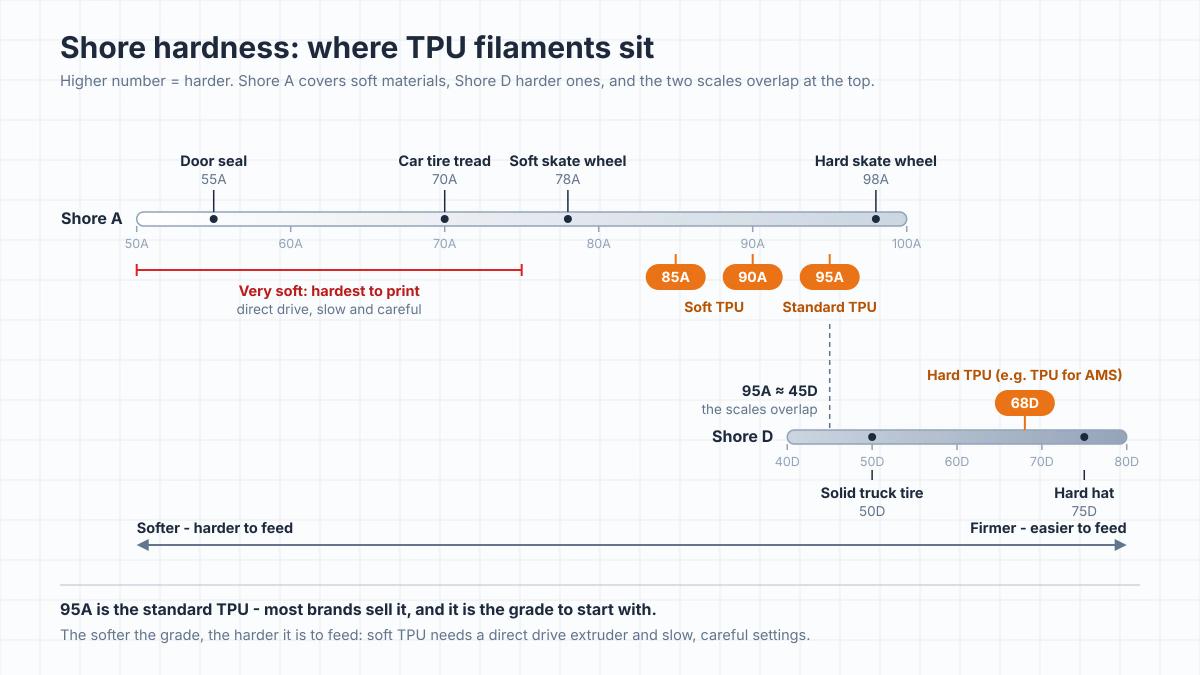
Flexible filaments are labeled with a Shore hardness, like 95A or 85A. The number comes from a durometer test (ASTM D2240) that measures how strongly a material resists an indenter pressed into it. The higher the number, the harder the material.
You'll see two scales on spools. Shore A covers softer materials and Shore D covers harder ones. The scales overlap and can't be converted exactly, but as a rough guide a 95A material measures about 45D. So a spool marked 68D is much firmer than a 95A one, not softer.
| Shore hardness | Everyday reference (typical values) | Filament grades | How it prints |
|---|---|---|---|
| 70-78A | Car tire tread (70A), soft skateboard wheels (78A) | Specialty soft grades | Very difficult; Bambu says not on its printers at 75A and below |
| 85-90A | Between soft (78A) and hard (98A) skateboard wheels | Soft TPU grades | Moderately difficult; direct drive strongly preferred |
| 95A | Just below hard skateboard wheels (98A) | Standard TPU from most brands | The standard grade; prints well on most direct drive printers |
| 60-75D | Between solid truck tires (50D) and a hard hat (75D) | Hard TPU, such as Bambu's 68D TPU for AMS | Easiest of the flexibles |
Hardness ratings are approximate; actual properties vary by formulation, settings and geometry.
95A is the default. Prusament, Polymaker, Bambu Lab and UltiMaker all sell a 95A TPU, so if a model listing simply says "print in TPU", 95A is the place to start. For a first TPU print, dry the spool, use the maker's profile and begin with a small test part.
Softer grades are harder to print. Soft filament bends easily, so instead of feeding smoothly into the hot end it tends to buckle. Bambu's printing guide says TPU of 75A or softer shouldn't be printed on Bambu printers.
Foaming TPU: one spool, several hardnesses
Foaming TPUs contain an agent that activates in the hot end. The hotter you print, the more the plastic foams, and the lighter and softer the part comes out. colorFabb's varioShore, for example, starts at roughly 92-95A unfoamed and drops to about 55A at maximum foaming, with the material expanding 1.4-1.6 times. Because the plastic grows as it leaves the nozzle, these filaments print with reduced flow, so use the maker's temperature and flow table rather than a standard TPU profile.
What TPU is good for (and what it isn't)
TPU earns its place wherever a rigid part would crack, slip or rattle:
- Phone cases and bumpers that cushion a drop.
- Gaskets, seals and washers that squash to close a gap. Printed seals can leak along layer lines, so test one under real conditions first, and don't rely on a print for compressed gas, hazardous fluids or anything safety-critical.
- Grips, straps and bands that bend every time you use them.
- Tires and treads for RC cars and toys.
- Feet, pads and shock absorbers that stop things sliding or rattling.
- Parts that rub against something. BASF's materials data says TPU is considered the most abrasion-resistant elastomer, and many grades stand up well to oils and greases. Chemical resistance varies by formulation, though, and acetone makes it swell.
Where TPU is a poor fit:
- Rigid parts. Brackets, enclosures and anything that has to hold its shape under load usually need a rigid filament like PLA or PETG, the everyday functional filament.
- Fine detail. Sharp edges and tiny features aren't TPU's strength, so miniatures stay in PLA or resin.
- Print-in-place and articulated models. TPU's squish can close up the tight clearances these designs rely on, so joints tend to fuse or stick. PLA is the right material for them.
- Models that need lots of supports. TPU supports need extra clearance to come off cleanly, so designs that print without them are a much better fit.
- Food contact. UltiMaker's TPU datasheet rules it out for food contact, and Polymaker says it isn't for kitchenware without certification. Even with a food-safe material, layer lines can trap bacteria.
If a part will live somewhere hot, wet or sunny, check the datasheet for your exact filament. Heat behavior varies between grades, polyester-based TPU is more prone than polyether-based TPU to breaking down in hot water and humidity, and some grades yellow in sunlight.
What to print with TPU from a model library
The best TPU prints start with models designed for flexible filament. A model drawn for PLA usually doesn't become useful just because you switch spools: a clip that holds by being stiff will simply bend in TPU. When you browse for TPU models, look for:
- The material named in the listing. If the designer tested it in TPU, ideally with the hardness, print it in that. Clearances and wall thicknesses were tuned for it.
- A flat base and few overhangs. TPU and supports don't get along, so models that print without them save you a lot of cleanup.
- A clear job for the flex. Bumpers, feet, gaskets, grips and tires use what TPU does well. A decorative figure gains nothing from it.
Soft or firm is partly up to your slicer
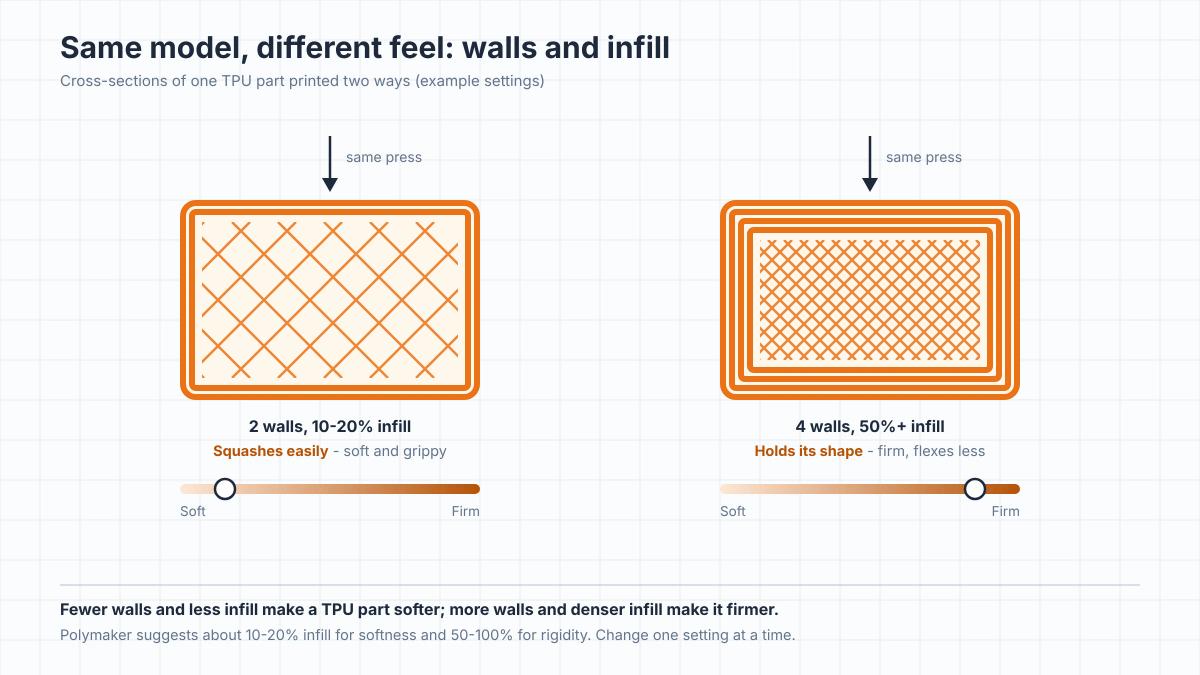
The hardness on the spool isn't the whole story. How soft a TPU part feels also depends on how much plastic is inside it. A print is mostly walls around a sparse infill, and fewer walls with less infill leave more air, so the part squashes more. More walls and denser infill make the same model firmer.
Prusa's advice for keeping a part flexible is to cut back the perimeters and top and bottom layers. Polymaker suggests around 10-20% infill for softness and 50-100% for rigidity. So one file can give you a soft, grippy foot or a firm bumper. Change one setting at a time and print a small test piece before committing to a long print.
What your printer needs to print TPU
Direct drive or Bowden
One of the biggest factors is where your extruder sits. If the extruder motor rides on the print head, right above the hot end, it's direct drive, and the filament has nowhere to go but down. If a tube runs from an extruder on the frame to the hot end, it's a Bowden setup, and soft filament can bend and bunch up inside that tube instead of feeding. Our FDM explainer covers the difference in more detail.
Firm grades like 95A can work on a Bowden machine with slow, careful settings. For soft grades, Polymaker says a direct extruder is required. Where the extruder tension is adjustable, Prusa also suggests loosening the idler so the gears push flexible filament through only very gently.
TPU and the Bambu AMS
Bambu's AMS is built for stiff filament, and most TPU doesn't qualify. Bambu Lab lists generic TPU, TPE and its own TPU 95A as unsupported in the AMS 2 Pro. The one TPU it approves there is its 68D TPU for AMS, a hard grade made for the feeder.
Bambu's printing guide warns that 80A-95A filaments can bend inside the AMS and recommends feeding softer TPU from a sealed dry box outside it. Supported materials differ between AMS models, so check Bambu's list for yours. Prusa likewise warns that automatic filament changes may not work properly with flexible filament. Our guide to how the AMS works covers the system itself.
The build plate
TPU sticks to smooth PEI almost too well. Prusa recommends a separation layer such as glue stick on smooth and satin sheets and warns that very soft flex can damage the PEI without one. Its textured powder-coated sheet needs no separation layer. Bambu's recommended bed temperatures for its TPUs also assume glue on the plate.
Print settings to start with
Start from a profile, not from numbers off a forum. If your filament maker publishes a slicer profile, use it; otherwise begin with your slicer's generic TPU preset, which is also the answer for an unlabeled spool. These are the ranges the big manufacturers give:
| Setting | Where to start | What to know |
|---|---|---|
| Nozzle temperature | About 210-245°C for most 95A TPUs | Ranges differ by brand and hardness; check the spool |
| Bed temperature | Anywhere from about 25°C to 75°C | Brands disagree here more than anywhere: Bambu suggests 30-35°C with glue, Prusa 60-75°C |
| Print speed | Slow for standard and soft TPU: Prusa calls 20 mm/s typical | High-flow TPUs raise the limit |
| Retraction | Follow the profile | Prusa says off is fine to start; Polymaker's TPU95 sheet lists 3-6 mm. It depends on the extruder, so test rather than copy a number |
| Drying | Around 60-70°C for 4-8 hours | Follow the label and your dryer's limits: Bambu and Polymaker say 70°C for 8 hours |
Follow the label and your dryer's limits: Bambu and Polymaker say 70°C for 8 hours
Older guides often say 15-30 mm/s and no faster. For standard and soft grades that's the right neighborhood: Prusa puts the maximum at 30-40 mm/s and Polymaker lists 30-50 mm/s for its standard TPU95. Push them harder and they fail to feed or clog, and if that happens, here's how to clear a clogged nozzle without damaging it.
High-flow TPUs raise that ceiling. Bambu Lab rates its TPU 95A HF at 12 mm³/s of maximum volumetric flow, the amount of plastic the hot end can melt per second, against 3.6 mm³/s for its regular TPU 95A. Polymaker lists 30-100 mm/s for its TPU95-HF. Soft grades go the other way: Bambu advises against raising the flow limit on its 85A and 90A.
Moisture matters just as much. TPU absorbs water from the air, and damp TPU prints badly: tiny bubbles, popping or hissing at the nozzle, rough surfaces and extra stringing. Bambu notes that in typical indoor air, around 55% humidity, freshly dried filament can start losing print quality within roughly 2-12 hours, so dry the spool before printing and keep it sealed or in a dry box while it runs.
Quick fixes for common TPU problems
- Bubbles, popping or a rough surface: the filament is damp. Dry it before you change anything else.
- Gaps, thin lines or filament bunching at the extruder: the filament is buckling. Slow down and, if your extruder tension is adjustable, loosen it.
- Stringing: dry the spool first, then tune retraction.
- A print stuck too hard to smooth PEI: use glue stick as a separation layer next time, or switch to a textured sheet.
PEBA vs TPU
PEBA (polyether block amide) is the other flexible filament you'll see on store shelves. It's the same type of material Arkema sells under the Pebax brand, best known from running-shoe midsoles, and Arkema says Pebax loses less energy than TPU when it flexes - in other words, it bounces back more.
| Property | TPU | PEBA |
|---|---|---|
| Weight | About 1.2 g/cm³ | About 1.0 g/cm³, so the same part is roughly 15-20% lighter |
| Bounce | Flexible and springs back | Loses less energy, per Arkema; sold mainly on energy return |
| In the cold | Stiffens sooner | Datasheets show it staying flexible at lower temperatures |
| Printing | Direct drive preferred, dry before use | The same; at least one maker also recommends an enclosure |
| Price | The cheaper of the two | Usually costs noticeably more than TPU |
| Availability | Almost every filament brand | A handful of brands |
Properties vary by grade and brand; check the datasheet of the spool you buy.
Be careful with rebound percentages on PEBA spools. Some listings quote energy return figures with no test method behind them, and TPU datasheets rarely list rebound at all, so there's no fair head-to-head number.
PEBA is worth the extra cost for insoles, light and springy parts where every gram counts, and parts that have to stay flexible in the cold. For everything else - cases, gaskets, tires, feet - TPU does the job for less money and with far more brands to choose from.
Frequently asked questions
Is TPU flexible or rigid?
Flexible, but how flexible depends on the grade. Standard 95A TPU bends and squashes like firm rubber, 85A and 90A grades are noticeably squishier, and grades on the D scale are much firmer and flex far less. The number of walls and the infill change how a printed part feels too.Is TPU hard to print?
Firm grades like 95A print well on most direct drive printers with a proper profile. It gets harder the softer the filament is, on Bowden printers, and when the spool is damp. Expect slower prints than PLA unless you use a high-flow TPU.Can you print TPU on a Bowden printer?
Often, yes, with firm grades like 95A, as long as you print slowly and use a tuned profile. Soft grades are a different story: they tend to buckle inside the tube, and Polymaker says they need a direct extruder.Can you use TPU in the Bambu AMS?
On the AMS 2 Pro, only Bambu's own 68D TPU for AMS is approved. Generic TPU, TPE and Bambu's TPU 95A are listed as unsupported, so feed softer TPU from a spool outside the AMS and check Bambu's compatibility list for your model.Is TPU food safe?
Don't assume it is. UltiMaker's TPU 95A datasheet says it isn't suitable for food contact, and Polymaker advises against using it for kitchenware without certification.Is TPU stronger than PLA?
They're strong in different ways. PLA is stiffer and holds its shape, but it can snap when overloaded. TPU bends, stretches and absorbs impacts instead of breaking: In lab tests, Polymaker measures its TPU95 stretching by about 550% before it fails - a material figure, not a promise for every printed part. If a part needs to flex or absorb knocks, use TPU; if it needs to stay stiff, use a rigid filament like PLA or PETG.Does TPU need to be dried?
Usually, yes. Damp TPU prints with bubbles, popping and stringing, and most spool labels call for around 60-70°C for 4-8 hours.What's the difference between TPU and TPE?
TPE (thermoplastic elastomer) is the whole family of rubbery thermoplastics, and TPU is one member of it. Filaments sold as "TPE" are usually the softer ones, so check the Shore number either way.
About the author
Written by
Ethan MillerI’m a 3D printing specialist with a background in mechanical design and hands-on experience with FDM 3D printing. I focus on filament selection, slicer settings, print optimization, and troubleshooting common printing issues. I enjoy testing different materials and printing techniques and sharing practical guides that help makers get more consistent and reliable results from their printers.