How to clean a 3D printer nozzle (and unclog it without wrecking it)

Most "clogged nozzle" problems aren't clogs. And a lot of the advice floating around will quietly destroy a coated or plated nozzle while you're trying to save it.
This guide walks through what's actually happening inside your hotend, how to tell a clog from the problems that look exactly like one, and which cleaning method matches your nozzle and your filament.
First: is it actually clogged?
Under-extrusion has several causes, and only one of them is fixed by cleaning. Before you heat anything up, spend thirty seconds on this.
The quick test: heat the hotend to your normal print temperature, then manually extrude 50mm of filament through the printer's menu. Watch what comes out.
| What you see | What it probably is | Where to go next |
|---|---|---|
| Nothing at all, extruder clicking | Full clog, extruder gear slipping, or another feed-path problem | Continue with this guide |
| Thin, wispy, or curling strand | Partial clog | Continue with this guide |
| Flows fine here, but fails mid-print | Heat creep | Not a cleaning problem |
| Flows fine, but prints under-extruded | Slicer flow rate, or a worn nozzle bore | Not a cleaning problem |
| Popping, crackling, steam | Wet filament | Dry the filament |
Two of these deserve extra attention because they're the most commonly misdiagnosed.
Heat creep happens when heat travels up the heat break and softens filament above the melt zone, where it isn't supposed to be soft. The tell: the first few minutes of a print are perfect, then extrusion drops off. Cleaning the nozzle fixes it for exactly one more print, then it comes back. The real fix is airflow on the heatsink and shorter retractions.
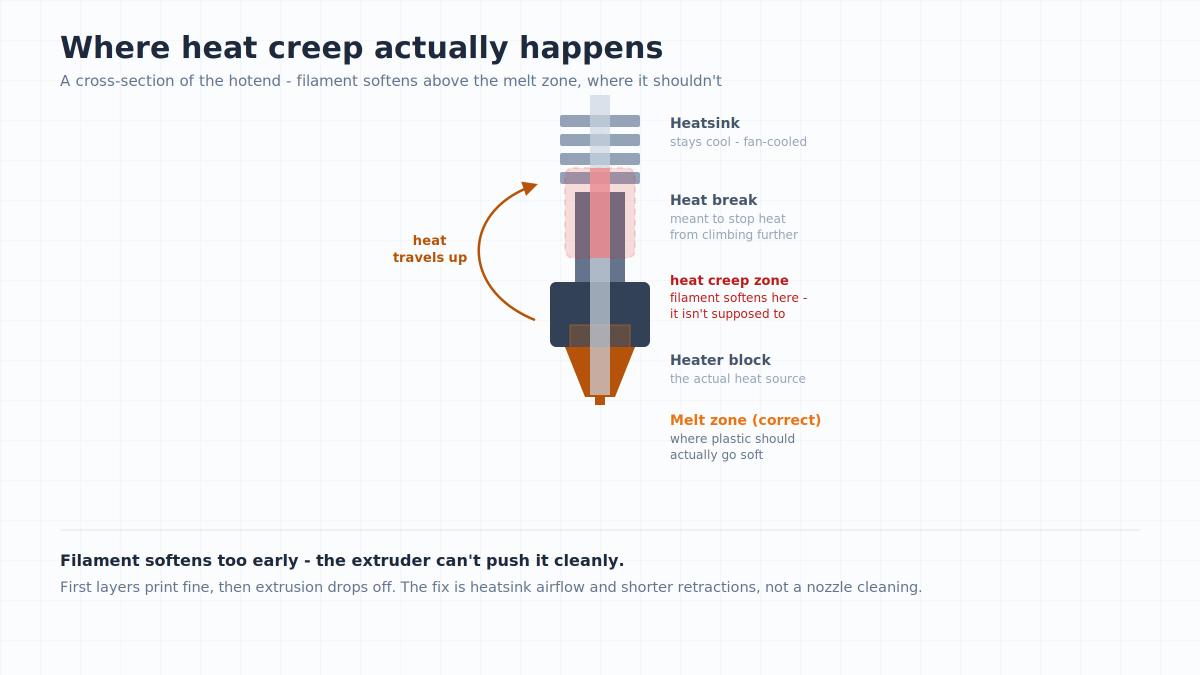
Key insight: a severe or persistent extrusion problem can contribute to molten plastic leaking from the nozzle or hotend interface, especially if the hotend is assembled incorrectly or there's a gap between mating parts.
Wet filament mimics a clog convincingly. Polyamide (nylon), PVA, and TPU are especially prone to absorbing moisture from the air, and PETG also has specific humidity requirements. That moisture flashes to steam in the melt zone, disrupting flow. If you hear popping or see tiny bubbles in the extruded strand, dry the spool thoroughly.
Before you touch it: what nozzle do you have?
This is the step nearly every guide skips. Cleaning methods that are perfectly safe on a plain brass nozzle will strip the coating off a plated one.
| Nozzle type | Brass brush | Acetone soak | Torch / open flame |
|---|---|---|---|
| Brass / standard | Yes | Yes | Can damage coatings and components - don't use unless specified |
| Hardened steel | Yes | Yes | As above |
| Plated / coated | Check manufacturer | Yes | No |
| Ruby-tipped | Check manufacturer | Check manufacturer | No |
If you don't know what you have, the safe default is: gentle brushing, no flame, and no aggressive scraping. Don't use aggressive mechanical tools or open flame unless the manufacturer specifically allows them.
Integrated hotends: some Bambu Lab printers, including the A1, P1, and X1 families, use integrated hotend assemblies rather than a conventional screw-in nozzle. The replacement procedure differs by series, so follow the manufacturer's guide for your exact model.
Key insight: nozzle material dictates what you can print and how you must clean it. Abrasive filaments (carbon fiber, glow-in-the-dark) rapidly destroy a standard brass nozzle, necessitating a hardened steel replacement.
Method 1: the brass brush
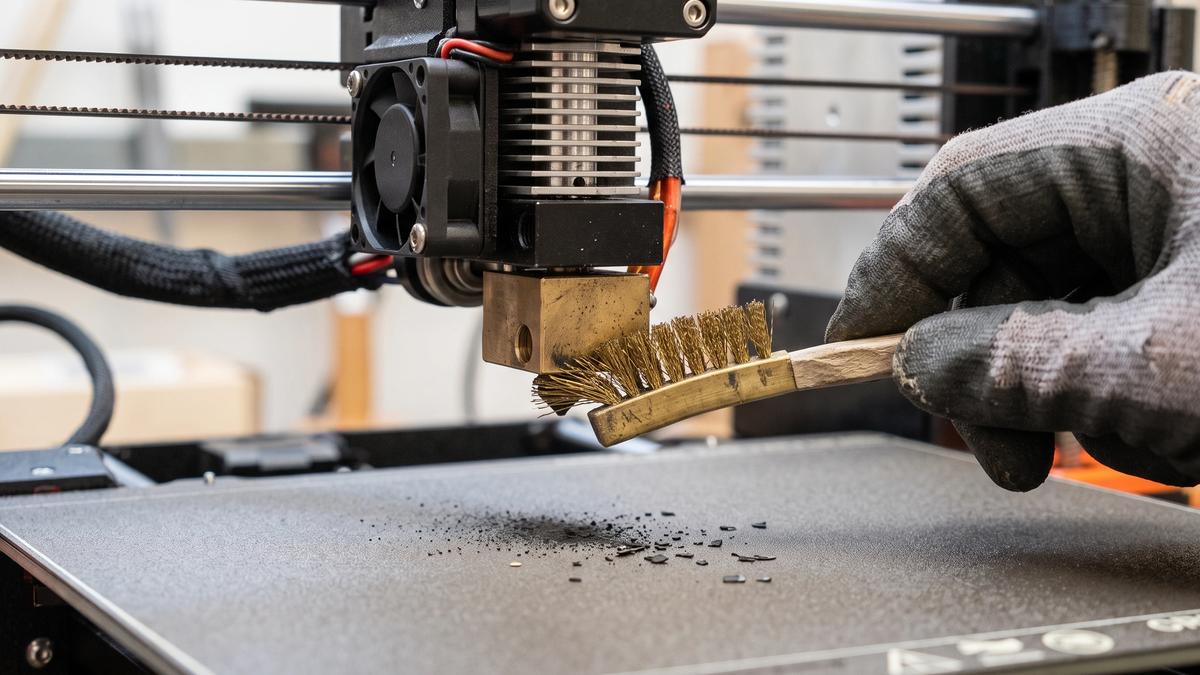
This is maintenance, not surgery. Inspect and clean the outside of the nozzle whenever plastic buildup starts to appear.
- Heat the nozzle to a temperature appropriate for the material currently on it, following the printer or filament manufacturer's recommendations. Softened plastic brushes off; cold plastic doesn't.
- Raise the Z axis so you have room to work, and put on heat-resistant gloves.
- Brush with short strokes angled away from the silicone sock above the nozzle.
- Wipe once with a dry cloth or a bit of isopropyl alcohol on a rag - never spray IPA directly onto a hot nozzle.
Method 2: the cleaning needle
For partial clogs near the tip. Use a cleaning needle only if your printer or nozzle manufacturer recommends it. Choose a tool specifically intended for your nozzle size, and never force it.
- Heat to printing temperature, then insert the needle gently up through the opening.
- Work the needle gently for a few seconds, then extrude 50mm of filament to flush out whatever you loosened.
Method 3: the cold pull
For many partial clogs, a cold pull is one of the best first-line methods. It reaches into the melt zone without requiring disassembly, but the correct filament and temperature depend on the nozzle and printer.
You melt filament in the nozzle, let it cool until it's soft but firmly gripping the internal walls, then yank it out - carrying the debris with it.
Example starting points (always check your manual):
| Pull filament | Starting point | Notes |
|---|---|---|
| PLA | Follow printer/nozzle manufacturer's procedure | Often preferred for cold pulls |
| Cleaning filament | Manufacturer's instructions | Designed specifically for hotend cleaning |
| Other filaments | Only if recommended for your hotend | Behavior varies significantly |
Steps:
- Unload whatever filament is currently loaded.
- Heat to the recommended temperature and push your pulling filament through by hand until a clean strand flows.
- Keep light downward pressure and start cooling the hotend.
- When you hit the pull temperature, grip the filament firmly and pull straight up in one steady motion. It should release with a distinct pop.
- Look at the tip you pulled out. A clean cone shape means success. A tip carrying dark flecks means it grabbed debris - run it again until the pulled tip comes out clean.
A successful cold pull takes on the exact internal shape of the nozzle, often pulling out dark flecks of burnt carbon or trapped dust.
Method 4: remove and soak
When in-place methods fail, take the nozzle off (if you have a standalone screw-in nozzle).
Removing it: heat the hotend first. A cold nozzle is welded in place by hardened plastic. Hold the heater block steady with one wrench and turn the nozzle with the other.
Reinstalling: tighten while hot to prevent leaks. Snug, not gorilla-tight.
Choosing a solvent:
| Filament stuck inside | What works |
|---|---|
| ABS / ASA | Acetone can dissolve it |
| PLA | Acetone is generally ineffective; use heat/mechanical cleaning or a compatible solvent like ethyl acetate |
| PETG | Mechanical/heat cleaning is usually more practical |
| Nylon | Mechanical/heat cleaning; solvent compatibility varies by nylon type |
Mechanical/heat cleaning; solvent compatibility varies by nylon type
Safety note: acetone and other solvents are flammable. Work outdoors or with real ventilation, keep away from ignition sources, wear eye protection, and never combine solvent soaking with an open flame.
Method 5: ultrasonic cleaning (optional)
If you already own an ultrasonic cleaner, use it only with a cleaning liquid and setup explicitly approved by the cleaner's manufacturer. Don't put flammable solvents such as IPA directly into a consumer ultrasonic cleaner unless the equipment is specifically designed for them.
Method 6: just replace it
At some point, cleaning stops being worth your time. As a practical rule of thumb, if you've spent more than 30 minutes troubleshooting or several cleaning attempts haven't helped, replacing a basic nozzle is often faster than continuing.
There's also a failure mode cleaning cannot fix: nozzle wear. Abrasive filaments grind the opening wider over time. Symptoms can include wider-than-expected extrusion, dimensional inaccuracies, and loss of fine detail on a printer that used to be fine.
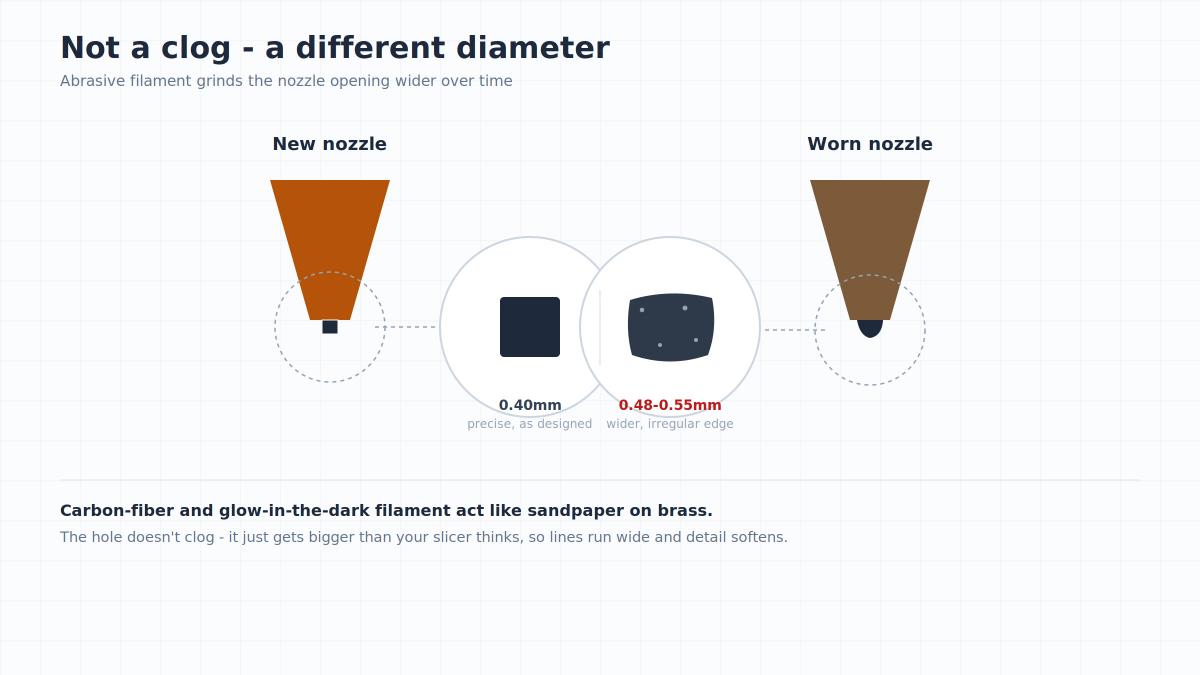
Key insight: if you've been running carbon-fiber or glow-in-the-dark filament through a brass nozzle, your nozzle isn't blocked - the hole is just larger than your slicer thinks. Not sure which filaments are the worst offenders? The fix is a hardened steel replacement. Our filament guide flags exactly which ones chew through brass.
Clogged nozzle, or a problem with the model?
Not every bad print is the printer's fault.
- Walls thinner than your nozzle. A 0.4mm nozzle can print features narrower than 0.4mm in some situations (using modern slicers with dynamic line widths like Arachne), but very small features become increasingly difficult to reproduce reliably. The slicer may produce broken, gappy extrusions that look like a partial clog.
- Non-manifold geometry. Holes or self-intersecting faces in the mesh make the slicer produce strange toolpaths. The print fails in a specific spot every time.
- Over-aggressive speed or flow. Pushing volumetric flow past what your hotend can melt starves the extrusion.
The diagnostic: print a simple calibration model or extrusion/flow test. If that comes out clean, your nozzle is fine and the issue is in the model or the profile.
How to stop it from clogging again
- Keep filament dry. A sealed box with desiccant prevents a whole class of problems.
- Purge between materials. Purge enough of the new material at an appropriate temperature to fully clear the previous filament before dropping to the new material's normal temperature.
- Match the nozzle to the filament. Abrasive materials get hardened steel.
- Keep the filament path clean. A simple filament filter can reduce the amount of dust reaching the extruder.
Frequently asked questions
Can you clean a 3D printer nozzle without removing it?
Yes. The brass brush, cleaning needle, and cold pull all work with the nozzle installed.What's the difference between cleaning the extruder and cleaning the nozzle?
The nozzle is the tip that filament exits. The extruder is the gear assembly that feeds filament toward it. They fail differently: a clogged nozzle blocks flow at the tip, while a dirty or worn extruder gear slips and grinds the filament instead of pushing it.What's the best way to clean a 3D printer nozzle?
For many partial clogs, a cold pull is a good first-line method, provided your printer and nozzle manufacturer allow it. Start with a brass brush if the buildup is external.Can I use a drill bit or a guitar string to clear a nozzle?
Not recommended. Both are harder than brass and will scratch or widen the bore, permanently changing your extrusion width.Can a TPU jam look like a clog?
Yes. TPU can buckle or deform in the extruder path, especially if the filament path or idler tension is unsuitable. Check the extruder path before assuming the nozzle is clogged.
About the author
Written by
Ethan MillerI’m a 3D printing specialist with a background in mechanical design and hands-on experience with FDM 3D printing. I focus on filament selection, slicer settings, print optimization, and troubleshooting common printing issues. I enjoy testing different materials and printing techniques and sharing practical guides that help makers get more consistent and reliable results from their printers.