Retraction settings: how to stop stringing on PLA, PETG and TPU
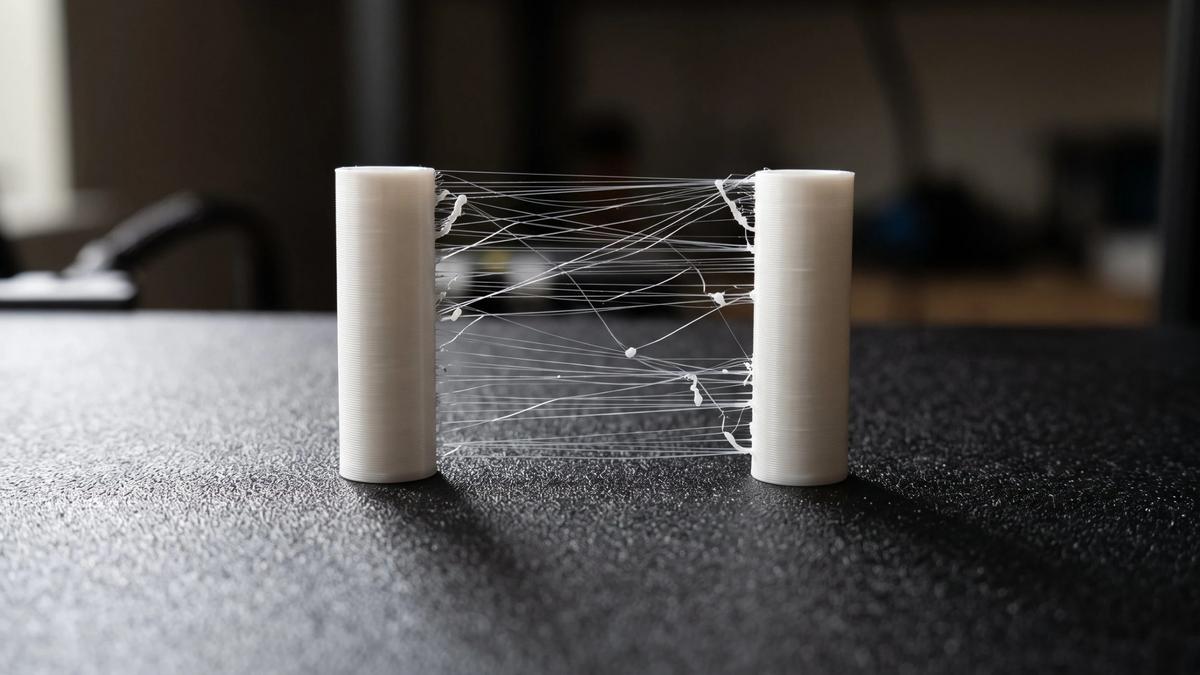

Stringing is the cobweb of thin plastic hairs that stretches between separate parts of a print. It happens when molten plastic leaks from the nozzle while the print head travels across open space, and retraction is the setting meant to stop it: before a travel move, the extruder pulls the filament back a little so the nozzle stops dripping. On most current printers the retraction in the stock profile is already close to right, so the fix for stringing is often somewhere else. This guide covers the cheaper fixes to try first, what each retraction setting does, what the slicers' own profiles use, and how to tune retraction for PLA, PETG and TPU.
What retraction does (and what it can't fix)
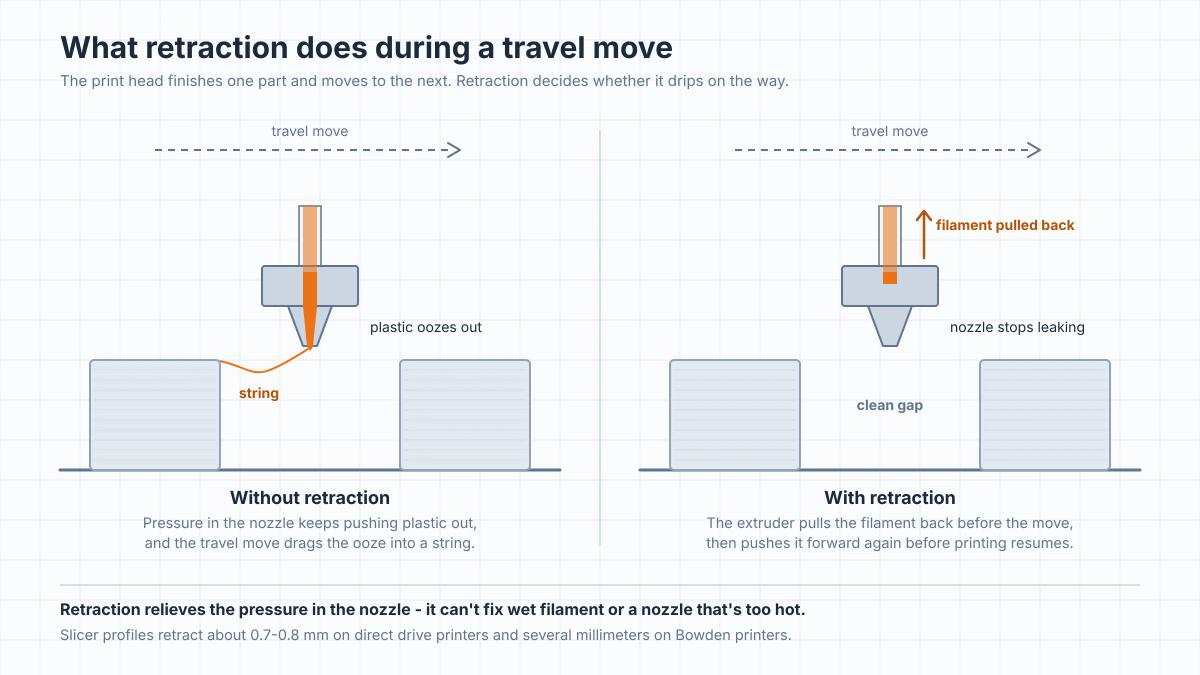
The hot end keeps the plastic in the nozzle under pressure, so when the head stops extruding and moves somewhere else, a little plastic keeps oozing out. Over a long travel move that ooze gets dragged into a string. Retraction relieves the pressure: the extruder runs backward by a set length, the head travels, and the extruder pushes the same length forward again before it starts printing. Our explainer on how FDM printing works covers the basics.
Retraction can only manage the pressure in a nozzle. It can't stop wet filament from foaming in the hot end, and it can't make an overly hot, runny plastic behave. That's why turning retraction up is rarely the first thing to try.
Before you change retraction
Try these first. They're quicker, and on a printer with a sensible profile they often fix stringing on their own:
- Dry the filament. Prusa's troubleshooting guide says wet filament "will cause a lot of stringing." Damp filament also pops and hisses at the nozzle. If you're not sure a spool is dry, Bambu Lab's advice is to dry it before printing. PETG, TPU and nylon absorb water faster than PLA, and our nylon guide explains how water in the filament turns to steam in the nozzle.
- Lower the nozzle temperature. Prusa suggests dropping it by 5-10°C and checking whether there's less stringing. Stay inside the range on the spool, because too cold a nozzle hurts layer bonding.
- Keep travel moves inside the part. Turn on the slicer option that routes travel over the model instead of across open air: Avoid crossing wall in Bambu Studio, Avoid crossing perimeters in PrusaSlicer, Combing in Cura. Prusa says this lowers stringing, especially on its Bowden-fed MINI.
- Clean the nozzle. Plastic stuck to the outside of the nozzle drags into strings and blobs. Our nozzle cleaning guide covers how to clean it without damaging it.
- Go back to the stock profile. If you've changed retraction settings on a printer that shipped with tuned profiles, reset them before tuning anything else.
The retraction settings that matter
Slicers name these slightly differently, but every slicer has them:
| Setting | What it does | What to know |
|---|---|---|
| Retraction length (distance) | How far the filament is pulled back | The main setting. Direct drive printers need far less than Bowden printers |
| Retraction speed | How fast it's pulled back | Prusa notes that faster pulls string less, but too fast can make the extruder motor skip steps |
| Z-hop (lift) | Lifts the nozzle during travel so it doesn't hit the print | Prevents collisions, but Prusa notes that a lower lift strings less |
| Wipe (wipe while retracting) | Moves the nozzle along the last line while retracting | Wipes ooze off the tip and reduces blobs at the start of the next line |
| Minimum travel (travel distance threshold in Bambu Studio and OrcaSlicer) | Travel moves shorter than this skip retraction | Prusa notes that raising it saves time but adds stringing |
| Avoid crossing walls (combing in Cura) | Keeps travel moves inside the part where possible | Keeps ooze inside the model; in Cura, combing also skips retractions on these moves unless you set a Max Comb Distance With No Retract |
| Maximum retraction count (Cura) | Caps how often the same piece of filament is retracted | Cura says repeated retractions can flatten the filament and cause grinding |
Setting names vary by slicer; look for the same idea in your slicer's extruder or filament settings, or in the Travel section of Cura's print settings.
Change one setting at a time, and change length before anything else.
Direct drive vs Bowden: what slicer profiles use
The right retraction distance depends mostly on where the extruder sits. On a direct drive printer the extruder motor is on the print head, right above the hot end, so a short pull is enough. On a Bowden printer the motor sits on the frame and pushes filament through a long tube, and the slack in that tube eats up part of every retraction, so Bowden printers need much longer retractions.
The profiles that ship with the slicers show the difference. In their source files, Bambu Studio's printer profiles for Bambu Lab's own printers retract 0.8 mm at 30 mm/s, and PrusaSlicer's profiles for direct drive Prusa printers use 0.7-0.8 mm. PrusaSlicer's profiles for the Bowden-fed Prusa MINI use 2.5-3.2 mm, and Cura's profile for the original Bowden Ender-3 retracts 5 mm at 45 mm/s with its generic PLA and PETG.
So if your printer came with a tuned profile, start from it. If you're on a Bowden printer with a generic profile, expect to land somewhere in the 1-6 mm range that OrcaSlicer's Bowden test covers, and find your number with a test rather than a guess. Check the tube too: Polymaker's advice is to make sure a Bowden tube is "high quality, properly seated, and has minimal internal friction." A tube that shifts in its fittings adds slack, and slack is what eats up a Bowden retraction.
How to find the right retraction for your printer
Retraction is easier to tune once the basics are right. OrcaSlicer's calibration guide puts it last in its filament calibration order - temperature, maximum volumetric speed, pressure advance, flow ratio, then retraction - because pressure advance and flow also change the pressure in the nozzle.
To run a retraction test:
- Dry the filament and set the temperature first. Otherwise you're tuning around moisture or a too-hot nozzle.
- Print a retraction tower. In OrcaSlicer, open the Calibration menu and choose Retraction (called Retraction test in older versions). Each section of the tower uses a longer retraction. Bambu Studio has the same Retraction test in the Calibration menu in its top bar (not the Calibration tab), but for Bambu Lab printers that menu only appears after you turn on Develop mode in the slicer's Preferences. That's a Bambu Studio setting, not the printer's own LAN-only Developer Mode. In other slicers, print a small test with two towers and change the length between runs.
- Pick the shortest clean setting. OrcaSlicer suggests 0-2 mm in 0.1 mm steps for direct drive and 1-6 mm in 0.2 mm steps for Bowden. Find the section with the least stringing, measure its height, and look up the retraction length used at that height in the G-code preview. If even the top of the tower strings, the problem isn't retraction - dry the filament and check that the nozzle is installed properly and isn't leaking.
- Save it with the filament, not the printer. Bambu Studio and OrcaSlicer let a filament profile override the printer's retraction (in Bambu Studio, on the filament's Setting Overrides page), and PrusaSlicer has the same option on its filament's Filament Overrides page. In Cura, retraction sits in the Travel section of the print settings, so save a custom profile for each material. That way a PETG or TPU value doesn't change how your PLA prints.
PLA, PETG and TPU
PLA rarely needs more than the stock profile. PrusaSlicer's PLA profiles keep the printer's retraction, and Bambu Studio's keep the printer's 0.8 mm on most of its printers and drop to 0.4 mm on a few newer models such as the H2D. None of them go longer. OrcaSlicer notes that on a direct drive printer, low-ooze filaments such as PLA may need as little as 0.2-0.4 mm. If PLA strings, look at moisture and temperature first.
PETG strings more than PLA, and the usual reflex is to retract more. The slicer makers barely do. Bambu Studio sets its own PETG to 0.4 mm on most of its printers, half the printer's 0.8 mm, and adds wipe and a spiral lift; its generic PETG keeps the full 0.8 mm on most models. PrusaSlicer's PETG profiles for its newer printers use 0.8 mm, at most 0.1 mm more than the printer's own setting, and pair it with wipe and a slightly lower lift of 0.15 mm. Dry PETG, print it at the low end of its temperature range and keep travel moves inside the part before you lengthen retraction.
TPU is soft and stretchy, and even Prusa's own guides pull in two directions. Its retraction guide says flexible filaments usually need longer retractions because the material stretches as it's pulled back, while its flexible materials guide says it's fine to turn retraction off and raise it step by step, since lower retraction means less risk of clogs and tangled filament. The slicer profiles disagree just as much. Bambu Studio's TPU profiles range from 0.4 mm to 2 mm depending on the printer, the longest at a slow 10 mm/s. PrusaSlicer's Generic FLEX uses 2.5 mm at 60 mm/s with no Z-hop or wipe, while Prusament TPU 95A keeps the printer's 0.7-0.8 mm. Start from the profile for your exact filament, change it in small steps, and read our TPU guide for the rest of the settings.
Signs you're retracting too much
Retracting too far causes problems of its own. Watch for:
- Gaps or thin lines after travel moves. The plastic hasn't fully refilled the nozzle when printing restarts.
- Clicking or grinding at the extruder. Repeated retractions chew the same piece of filament until the drive gears can't grip it. Cura's Maximum Retraction Count exists to prevent exactly this.
- Clogs. Polymaker warns that over-retraction can pull molten filament into cooler parts of the hot end, where it hardens, and that long retractions on Bowden printers can form plugs. If a hot end jams in the middle of prints, a too-long retraction is one of the suspects in our nozzle cleaning guide.
- Slower prints. Every retraction and Z-hop adds a little time, and on a model with many small islands it adds up.
If you see any of these, shorten the retraction and fix the stringing with temperature, drying and travel settings instead.
Frequently asked questions
What is a good retraction distance?
It depends on the extruder. Printer profiles for direct drive machines usually retract 0.7-0.8 mm, and some filament profiles go down to 0.4 mm. Bowden printers need several millimeters - PrusaSlicer uses 2.5-3.2 mm for the Bowden-fed Prusa MINI, and Cura's Ender-3 profile uses 5 mm with its generic PLA and PETG. Start from your printer's own profile and fine-tune with a retraction test.What retraction speed should I use?
Keep the speed from your printer's profile unless you have a reason to change it. The slicers' own profiles use about 30-45 mm/s on direct drive printers, while Bowden profiles range from Cura's default of 25 mm/s to 70 mm/s on the Prusa MINI. Prusa notes that a faster pull strings less, but too fast can make the extruder motor skip steps.Why does my print still string after tuning retraction?
The most common reason is wet filament, which strings no matter how the retraction is set. Too high a nozzle temperature is the next suspect, followed by long travel moves across open space and a dirty nozzle. Dry the spool, lower the temperature by 5-10°C and keep travel moves inside the part.Does Z-hop cause stringing?
It can. Lifting the nozzle during travel pulls the ooze into a longer string, and Prusa notes that a lower lift strings less. Z-hop is there to stop the nozzle from hitting the print, so keep it small rather than turning it off if your prints have tall, thin features. Bambu Studio offers a spiral lift and PrusaSlicer a ramping lift, which raises the nozzle along a slope instead of straight up, and both slicers' tooltips say these help against stringing.What retraction settings work for PETG?
Usually about the same as for PLA, or even shorter. Bambu Studio's own PETG profile uses 0.4 mm on most Bambu Lab printers, half the printer's default, and PrusaSlicer's PETG profiles for newer printers use 0.8 mm, close to the printer's own 0.7-0.8 mm, with wipe and a lower lift. PETG strings because it oozes more and absorbs moisture, so drying it and printing at the lower end of its temperature range help more than a longer retraction.Should you use retraction with TPU?
Usually, but the makers disagree on how much. Slicer profiles for direct drive printers range from 0.4 mm to about 2.5 mm, and Prusa says it's fine to start with retraction off and raise it step by step. Start from the profile for your exact TPU and change it in small steps.Can too much retraction cause clogs?
Yes. Retracting too far can pull molten plastic up into the cooler part of the hot end, where it hardens and blocks the filament path, and it's a bigger risk on Bowden printers with long retractions. Repeated retractions can also grind the filament at the extruder.
About the author
Written by
Ethan MillerI’m a 3D printing specialist with a background in mechanical design and hands-on experience with FDM 3D printing. I focus on filament selection, slicer settings, print optimization, and troubleshooting common printing issues. I enjoy testing different materials and printing techniques and sharing practical guides that help makers get more consistent and reliable results from their printers.