How to smooth a 3D print (without sanding away the detail)
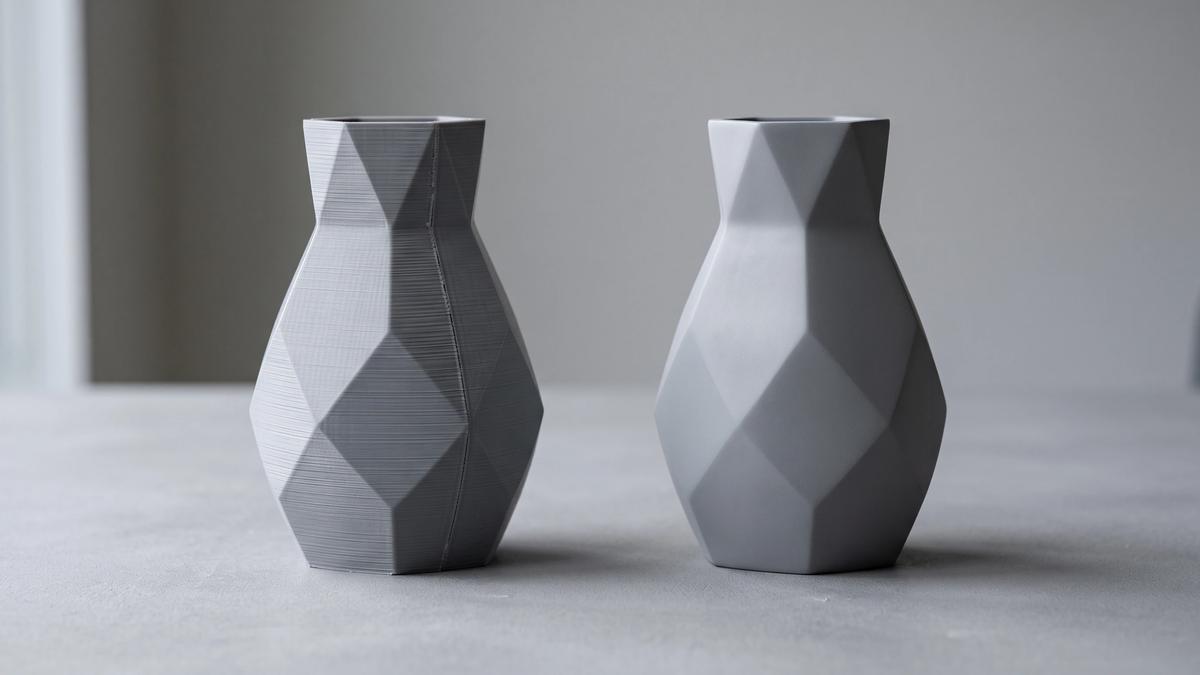

Most guides to smoothing 3D prints hand you a list of five methods and let you pick. That's how people end up sanding the face off a miniature, dunking PLA in alcohol that does nothing to it, or taking a heat gun to a part that was dimensionally perfect until they touched it.
The method should follow from two things: what the part is made of, and what it's for. This guide starts there - and with the step almost everyone skips, which is getting a smoother print out of the slicer before you ever pick up sandpaper.
First, figure out what "rough" actually means
"Not smooth" covers several different problems, and each one has a different fix.
| What you see | What it is | Best fix |
|---|---|---|
| Even horizontal ridges across the whole surface | Layer lines | Slicer settings first, then sanding or filler primer |
| A vertical line of bumps down one side | Z-seam | Seam placement in the slicer, light sanding |
| Rough patches or small scars on the underside | Support contact points | Flush cutters, then local sanding |
| Fine hairs between parts of the model | Stringing | A quick pass with a hobby knife or a lighter touch of heat |
| Grainy, pitted surface all over | Usually wet filament | Dry the spool - no finishing step fixes this properly |
If your problem is in the last row, stop here and dry your filament. Sanding a print full of moisture pits just exposes more pits.
The cheapest smoothing happens in the slicer
Every minute you spend on settings saves several with sandpaper. None of these changes cost anything but print time.
Lower the layer height where it matters. Layer lines are the steps between layers, so thinner layers mean smaller steps. You don't have to print the whole model fine: variable (adaptive) layer height in PrusaSlicer, Cura, Bambu Studio, and OrcaSlicer uses thin layers only on curved and sloped areas, where stepping is most visible, and keeps thicker layers on vertical walls.
Orient for the surface you'll see. Layer lines are most noticeable on shallow slopes, where each layer steps out slightly past the one below it - the classic "staircase" on a dome or a gently curved face. The same surface printed as a near-vertical wall shows far less stepping. Rotate the model so the face that matters most is as close to vertical as your supports allow.
Use ironing for flat tops. Ironing makes the hot nozzle pass back over the top layer with almost no extrusion, flattening it. It only works on flat, upward-facing surfaces - it does nothing for walls or curves - but on a lid, a sign, or a base, it can remove the need for sanding entirely.
Put the seam somewhere useful. Slicers let you choose where each layer starts and ends. Set it to "rear" or paint it onto a corner, and the Z-seam ends up where nobody looks. The designers' side of this - hiding the seam in the model's geometry itself - is covered in our guide to making an STL file that actually prints.
Pick a method by material
Not every method works on every plastic, and a few popular suggestions do nothing at all.
| Material | Works well | Doesn't work or not worth it |
|---|---|---|
| PLA | Sanding, filler primer, epoxy coating | Acetone and isopropyl alcohol - neither smooths PLA |
| PETG | Filler primer, epoxy coating | Sanding is slow and tends to go fuzzy; no practical home solvent |
| ABS and ASA | Acetone vapor smoothing, sanding, primer | - |
| PVB (e.g. PolySmooth) | Isopropyl alcohol vapor or mist | - |
| Resin | Wet sanding, primer | Vapor smoothing - resin doesn't respond to it |
If you haven't printed the part yet and a glossy, layer-free finish is the goal, the material choice is itself a smoothing decision.
Sanding done right
Sanding works on almost everything, and it's where most of the damage happens, too. A few rules make the difference.
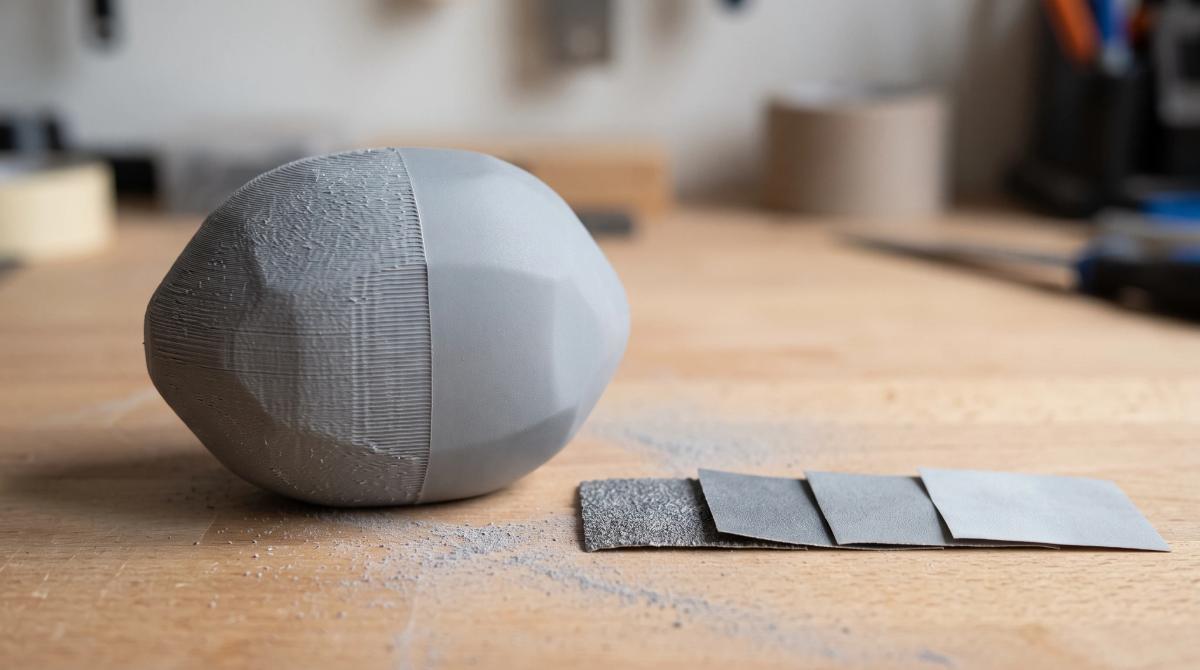
Start only as coarse as you need. The first grit's job is to take the tops off the layer lines. On prints with normal layer heights, something in the 120-220 range is a common starting point; a fine-layer print may not need anything that coarse. Starting too rough just creates deep scratches you then have to sand out.
Work up through the grits. Each step removes the scratches left by the one before. A typical path runs through 220, 400, and 600 before primer or paint, and on up to 1000-2000 only if you want the bare plastic polished. Skipping steps saves nothing - the coarse scratches show through later.
Sand across the layers, not along them. Small circles or a diagonal cross-hatch level the ridges. Sanding in straight lines parallel to the layers tends to dig into the grooves and can make the lines more visible, not less.
Go wet from the middle grits on. Wet sanding with waterproof paper keeps the dust down, stops the paper from clogging, and - important for PLA - keeps the surface cool. PLA starts to soften at fairly low temperatures, and friction from fast, heavy dry sanding can smear the surface instead of cutting it. Light pressure and water fix that.
Wear a mask. Sanding dust is fine plastic particles, and cured resin dust in particular is something you don't want to breathe. Wet sanding helps; a dust mask helps more.
Filler primer: the best smoothing for anything you'll paint
If the part is getting painted anyway, filler primer usually beats hours of sanding. It's a thick, sandable primer that settles into layer lines and fills them.
The routine is simple: a light sand to knock down the worst ridges, a couple of thin coats of filler primer (following the can's drying times), a light sand with fine paper, and repeat until the layer lines are gone. Thin coats are the point - one heavy coat runs and pools instead of filling evenly.
It's also the method that costs the least detail, which is why it's the standard approach for miniatures. Our FDM miniature guide and our painting guide both build their finishing steps around it.
Epoxy coatings: fast, glossy, and not for tight fits
Two-part coating epoxies made for 3D prints, such as XTC-3D, are brushed on in a thin layer and level themselves out as they cure, filling layer lines in one pass. The result can be sanded further or left glossy.
The catch is that epoxy adds material. It builds up on every surface it touches, pools in recesses and fine details, and changes the size of holes and joints. That makes it excellent for props, vases, and display pieces, and a poor choice for anything that has to fit something else - or for miniatures, where it fills exactly the detail you printed for.
Vapor smoothing: only for the right plastic
Vapor smoothing uses a solvent to briefly soften the outer skin of a print so the layer lines flow together. It gives the most dramatic, glossy result of any method - but only on plastics the solvent actually dissolves.
ABS and ASA respond to acetone. Acetone vapor in a closed container melts the surface into a glossy, near-injection-molded finish. It's also the method with the most safety baggage: acetone is highly flammable and the vapor has to be handled carefully. We cover the full process, including what can go wrong, in our ABS filament guide.
PVB responds to isopropyl alcohol. PVB-based filaments such as Polymaker's PolySmooth print much like PLA and are designed to be smoothed with alcohol - either in a dedicated misting machine (the Polysher) or by hand with a spray bottle. It's the easiest route to a glossy, layer-free print at home, as long as you plan for it before printing.
PLA doesn't respond to either. This is the most common piece of wrong advice in smoothing guides. Isopropyl alcohol does nothing to PLA - Polymaker's own specification for the Polysher states it plainly. Acetone doesn't meaningfully smooth PLA either. If you want vapor-smooth results, print in ABS, ASA, or PVB.
Heat guns and harsh chemicals: what to skip
Heat guns. You'll see the heat gun recommended for smoothing PLA. In practice it's hard to control: the difference between "slightly glossy" and "slumped" is a second or two, and thin features deform first. It's genuinely useful for one thing - a very quick pass to shrink away fine stringing - and not much else.
Dichloromethane (methylene chloride). It does dissolve PLA, which is why it keeps appearing in smoothing guides. It's also a hazardous solvent that the EPA has restricted for consumer use in the US. It has no place in a home workshop.
Other PLA solvents. Some makers experiment with ethyl acetate, which does soften PLA. Results are much harder to control than acetone on ABS, and it's still a flammable solvent. For PLA, sanding and filler primer remain the reliable route.
Miniatures: smooth without losing detail
Miniatures break most of the rules above. The whole point of the model is fine detail - faces, chainmail, fabric folds - and sanding removes exactly that. Even fine sandpaper rounds off sharp edges and softens texture within seconds.
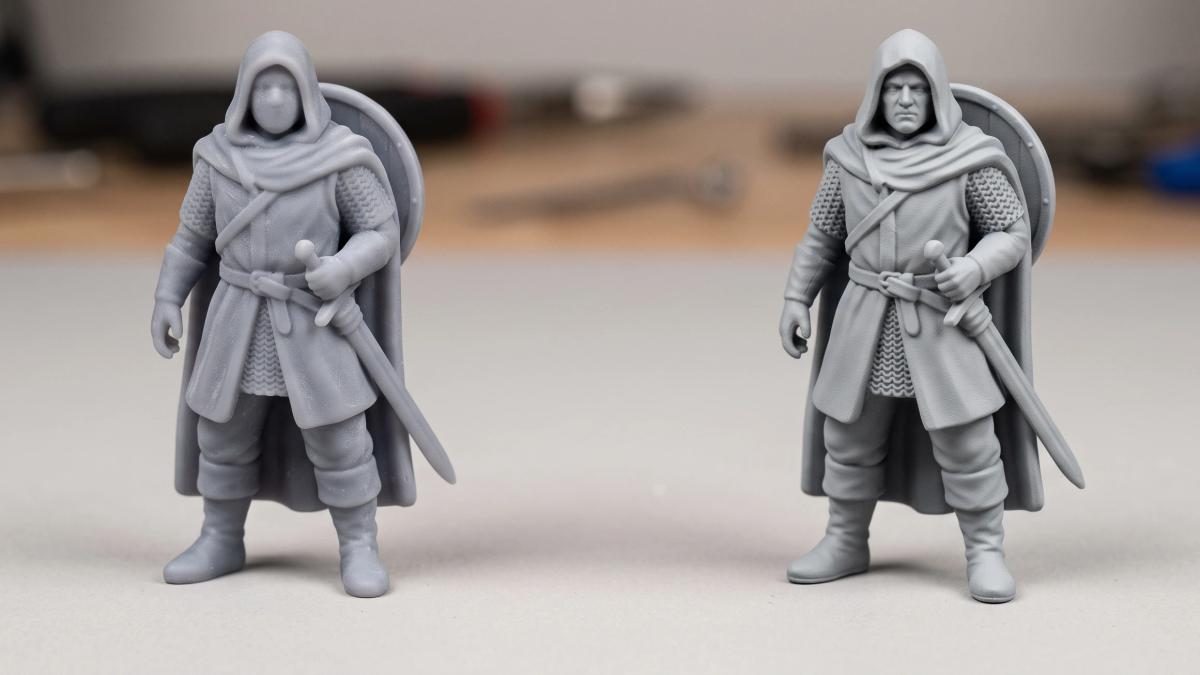
For FDM miniatures, the reliable approach is to get the smoothest possible print from the slicer (fine layers, good orientation), then use filler primer and nothing more aggressive. Sanding is only for flat areas like the base rim and for support scars, and even then with a fine needle file or a small piece of paper rather than a sanding block.
Resin miniatures usually need even less. Their layer lines are fine enough that a standard primer covers them; the finishing work is mostly about cleaning up support marks. The safety side of handling and sanding resin is covered in our resin printing guide for beginners.
Functional parts: every method changes the dimensions
If a part has to fit, slide, snap, or screw onto something, treat smoothing as a dimensional change, not a cosmetic one
Sanding removes material. Primer and epoxy add it. Vapor smoothing slightly rounds sharp edges and can soften fine threads and small holes. On a decorative piece none of that matters; on a bracket with a 0.2mm clearance, it's the difference between a part that fits and one that doesn't.
Two habits help. Mask or skip the surfaces that mate with other parts - holes, pegs, sliding faces - and smooth only the visible ones. And if a part needs to be both smooth and precise, get the smoothness from the slicer first, so there's less post-processing to throw the fit off.
Frequently asked questions
What is the easiest way to smooth a 3D print?
For most people, filler primer. It works on PLA, PETG, ABS, and resin, needs no special equipment, and fills layer lines with far less effort than sanding alone. Pair it with a light sand between coats.What grit sandpaper should I use on 3D prints?
Start around 120-220 to knock down layer lines, then work up through roughly 400 and 600 before priming or painting. Go to 1000-2000 only if you want to polish the bare plastic. Switch to wet sanding from the middle grits onward.Can you smooth PLA with acetone?
Not in any useful way. Acetone smooths ABS and ASA, but it doesn't meaningfully dissolve PLA. For PLA, use sanding, filler primer, or an epoxy coating.Does isopropyl alcohol smooth PLA?
No. Isopropyl alcohol only smooths PVB-based filaments such as PolySmooth. It has no effect on PLA, despite appearing in several smoothing guides.How do I get rid of layer lines without sanding?
Reduce them in the slicer first - thinner or adaptive layers, better orientation, and ironing for flat tops - then use filler primer or an epoxy coating for the rest. Or print in ABS, ASA, or PVB and vapor smooth.Should I sand 3D printed miniatures?
Only the flat areas and support scars. Sanding the figure itself removes the detail you printed it for. Filler primer is the standard way to hide layer lines on miniatures.
About the author
Written by
Ryan CarterI’m a 3D printing and miniature painting specialist with a background in digital modeling and tabletop gaming. I focus on 3D-printed miniatures, resin and FDM printing, model preparation, supports, priming, painting, and finishing techniques. I enjoy experimenting with different workflows and helping makers turn digital models into detailed, tabletop-ready miniatures.